BOAA downloads no longer match and duplicate transactions

When I was using web connect the transactions downloaded would not match the transactions I manually entered even though the amounts matched exactly. This was working until late last year. This results in duplicated transactions and a messed-up register. For a while it was only a few then it turned into dozens. I stopped using webconnect and begain manually downloading the QFX file. This worked until October when I saw that BOA stopped using QFX files. I decided to try online download again and it ONCE again totally messes up the register of my accounts and duplicating transactions. How do I fix this????
Answers
-
There are a few ways of doing this and assuming that what got downloaded is about a month worth of transactions (typical for most banks), a manual approach might be the fastest:
In your BofA register, go to the "Register Columns" selection box near the top right, and select "Downloaded posting date" as seen in the image below.
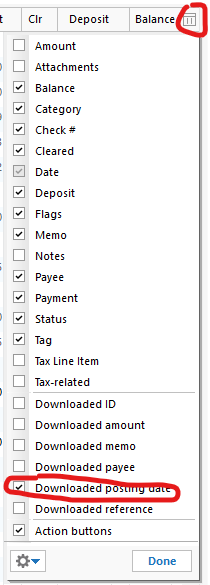
Now sort your register by this column by clicking at the top of the column. Looking at the last month's worth of transactions, hopefully you can identify the duplicate ones next to each other and delete them accordingly. The newly [duplicate] downloaded ones would typically be "Uncleared". Let's hope this helps.
You can optionally filter your register by the last three months as well as another filter for uncleared transactions. But may not guarantee duplicates results.
It's been years since I had do deal with this challenge, so my memory with other solutions is unfortunately unclear and I couldn't find the posts by SuperUsers which outlined various options by disabling the auto download to banking registers in Preferences - prior to downloading.
- Q Win Deluxe user since 2010, US Subscription
- I don't use Cloud Sync, Mobile & Web, Bill Pay0
