how to apply pre-determined percentage split to non-memorized transactions

I have a number of rental properties, and I download hundreds of transactions from various supplier credit cards for materials and services. some transactions are applied directly to individual properties as repairs or supplies. Some transactions are split evenly to all properties if they are serving the entire portfolio.
Is there a way to memorize a split by percentage that can be applied to individual transactions without quicken trying to apply it to all transactions for the particular payee?
Thank you for any help
Doug c
Answers
-
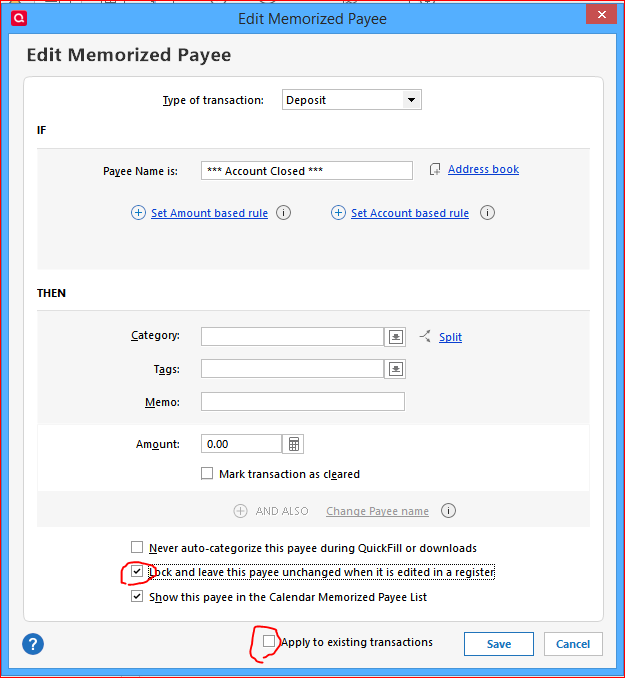
If you have a Memorized Transaction which you use as a model for the Splits, be sure to save the transaction's Memorized Payee List entry with the options
- "Apply to existing transactions" disabled and
- "Lock and leave … unchanged …" enabled.
 0
0 -
Thank you but I don't understand how this helps me when I select certain transactions, and determine I need to do an equal split to 12 different tags (properties). can you help me understand?
0 -
What I may have failed to articulate is I have many transactions that need to be split evenly to 12 different properties. out of a 1000 transactions maybe 300 need to be split and the split is always the same. not all transactions need to be split, the remaining are applied to individual properties. the splits are extremely time consuming and is exactly the same every time.
0 -
The answer still lies in implementing the Memorized Payee transactions feature to achieve this. You need to build a library of all possible splits using a unique Payee name to identify them.
0 -
I think I'm reading this differently than others. I think @Doug C doesn't want to make and maintain dozens of the same splits for unique vendors/payments, but a single split he can apply as needed. Consider a single Memorized Payee called Twelve-Way Split (or whatever name makes sense to you) and use Tags instead of Payees to help you sort them out for your reports/taxes. Might be a bit more work at the end of the year because everything isn't broken out as clearly as Payees, but could speed up your transaction entry throughout the year, a reasonable time trade-off. Quicken memorizes the Tags, so you only have to type a few letters to fill out the full Tag name.
0 -
Thank you!!! If I understand correctly, if I create a Payee named "Lowes-Split" and set it up with the percentage splits, then download the Lowes transactions, then change the name to the memorized "Lowes-Split" and it will apply the split, am I understanding this correctly?
0 -
for the life of me I can not make this work :(
I created a memorized payee called Lowes-Split with the same category (Rental Supplies) in 10 rows and 10% allocated to each row.
I then go to the register and change the name of a transaction from Lowes to Lowes-split and the only thing I can get to happen is the category changes to "Rental Supplies" but no split.
Please! What on earth am I missing?
0



Categories
- All Categories
- 6 Product Ideas
- 34 Announcements
- 249 Alerts, Online Banking & Known Product Issues
- 19 Product Alerts
- 266 Welcome to the Community!
- 301 Before you Buy
- 1.5K Product Ideas
- 55.8K Quicken Classic for Windows
- 16.9K Quicken Classic for Mac
- 1K Quicken Mobile
- 834 Quicken on the Web
- 129 Quicken LifeHub