two graph questions

Can tags be added as a subset the categories with using graphs?
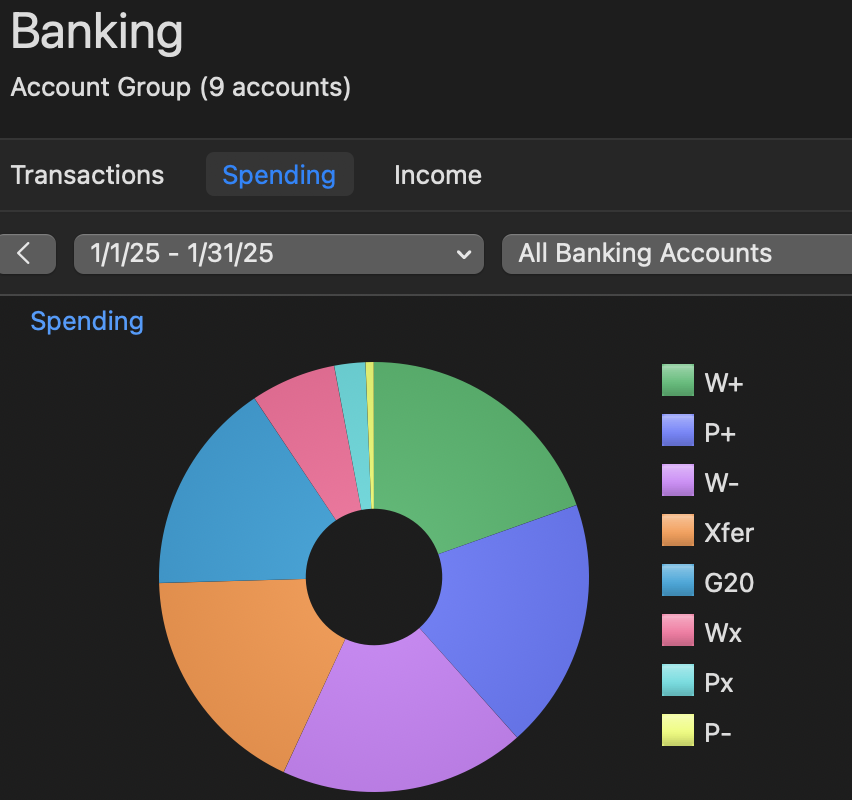
the picture below is the ways in which i first break down transaction - have a system that works for me using both catagory and tags for a furture breakdown; I like to get granular and really see where the money is coming from or going to.
to hopefully clarify further; is there a way to see graphs with tag breakdowns under the categories?
also how can you hide one of the 'category' items? eg- xfer: denotes transfers and things that are doubled that i don't want showing in my spending OR income totals - (like paypal taking money from bank account so the app can pay for something, don't need this twice)
Quicken Classic
mac w/ ventura 13.7.8
Version 8.3.2 (Build 803.58902.100)
Answers
-
I don't think there are any graphs in Quicken Mac that you can customize by both category and tag. The Spending graph in your picture I don't think can be customized at all. The Spending by Category graph on the Dashboard has some options that let you exclude specific categories but there are no tag options there either. You'll have to run a report to get that level of customization.
0 -
thanks for clarifying. bummer tho. they make the graphs kinda useless for a lot of us then you can't even hide them in that constricted view.
0