Local Backup - Behavior versus set limits

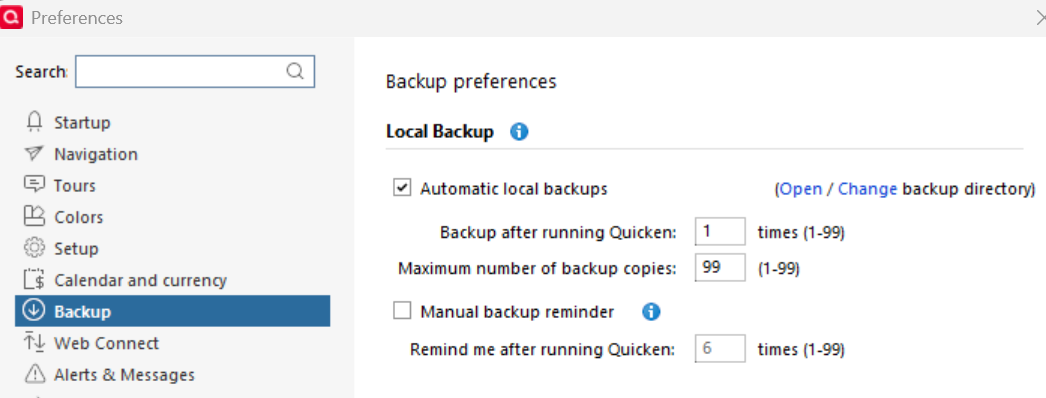
The Local Backup process has been a lifesaver for being able to find and recover from the onset of serious data or functional issues. I use Automatic local backups to create a quick backup every time I exit Quicken and do less frequent backups to the Cloud (my own schedule). I've set a large number of Maximum number of backup copies to 99 to maximize my "recovery" range (see graphic below). My presumption is that it will continue to accumulate backups until it hits that Maximum. My question is what does it do at that point ? Does it just quit ? And does it warn you that it has quit ? I suppose I could just test it with a lower number and observe what happen, but thought I would just put the question out there to see if anybody knows the authoritative answer. Thank you.
Comments
-
The intent is that the oldest one is deleted. But there are questions about that process if the backups gets dates added to the file names. Best to test for your settings.
1 -
Thanks @q_lurker , that sounds like the right intent, but I will test and report back. Thanks for your response.
0 -
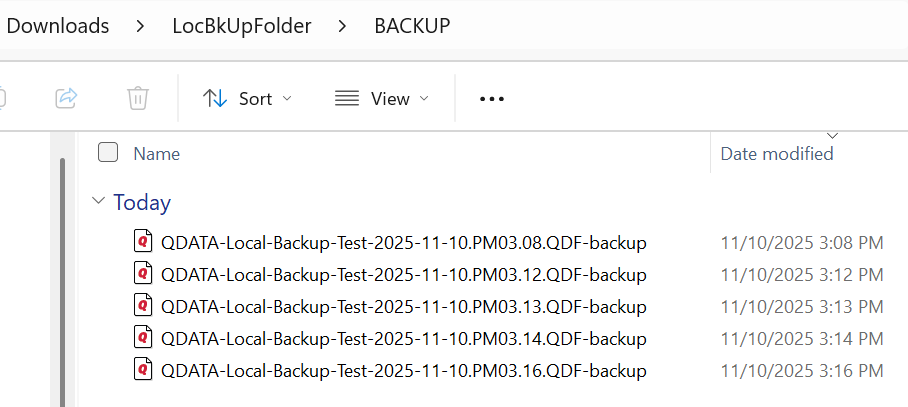
I answered the question by running a short test, with a Maximum number of backup copies set to 5. It worked as expected and intended, accumulating 5 copies on 5 separate program exits, and after that, the oldest one dropped off as a new one was added on.
 0
0 -
Also, I did not see anything within the Preferences to turn Date and Time stamps on or off in the filename. It included both without me asking, which is totally fine by me
0 -
Agreed. There is not an option for naming auto-backup files. They get the date and time appended.
0
