Bank Download Errors

One of the financial institutions that I bank with is Navy Federal Credit Union. Here is a snapshot of how the accounts setup thru one step update -
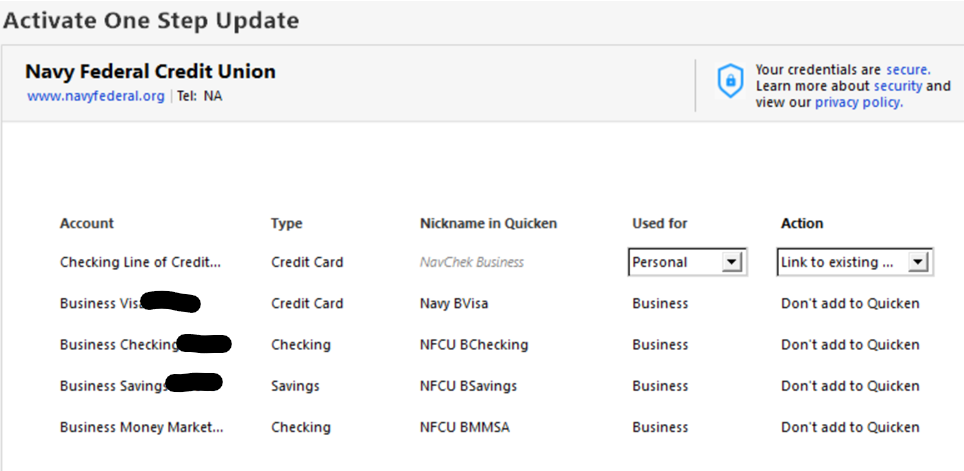
The issue I am facing is the Checking Line of Credit. This account is linked to my checking account for overdraft protection. However, when I do the update, I am getting transactions that never hit my line of credit and came out of my Business Checking.
Example –
I transferred $5.00 from my checking account to a savings account. Upon performing a One Step Update, I get the transaction download into my checking line of credit and not my checking account. The accounts are linked properly, but the transactions never download into my checking account and always hit my line of credit account. This has worked properly in the past, but I stopped using Quicken for a time and am back updating my accounts, so I am unsure as to when this functionality stopped working properly. The troubleshooting steps I have taken so far are –
- Perform Super Validation on the Data File
- Disconnected the bank from the accounts of that financial institution and relinked them to the proper accounts again.
Any assistance you can provide would be greatly appreciated.
Comments
-
The line of credit (LOC) account is a physically separate account and must be maintained as such in Quicken.
It is "linked to a checking account" so that the bank computer will know when to auto-transfer funds from LOC to your business checking account to cover overdrafts.
This type of link cannot be defined in Quicken and is not necessary to do so.
As I said earlier, you need separate account registers, one for the business checking account, one for the LOC.
When activating the accounts for downloading, the individual bank accounts need to be correctly LINKed to their respective Quicken account registers. This will ensure that downloaded transactions end up in the correct Quicken register.-1 -
As shown in the picture provided, the Line of Credit (LOC) is setup as a totally separate account "NavChek Business". I explained the link between the two purely for academic reasons for Intuit to possibly explain why this could be happening. This morning I performed my one step update as I do every morning. I received 1 downloaded transaction in the business checking that matched a payment I made. I also received 1 downloaded transaction in the (LOC) register that also belongs to my checking account and never hit my LOC. The transfer was from a savings account into the checking account.
0

Categories
- All Categories
- 52 Product Ideas
- 34 Announcements
- 247 Alerts, Online Banking & Known Product Issues
- 20 Product Alerts
- 514 Welcome to the Community!
- 680 Before you Buy
- 1.5K Product Ideas
- 55.5K Quicken Classic for Windows
- 16.8K Quicken Classic for Mac
- 1K Quicken Mobile
- 832 Quicken on the Web
- 126 Quicken LifeHub