Downloads from Citizens Going Wrong Places

On Windows Bus+Pers R64.35
Account referenced has three savings accounts; checking, and Overdraft Protection.
I've been using Citizens Bank and Quicken since like Win 31 and this is a new one on me. I need help from the Quicken side to confirm what it is they're doing, because tech supports is playing dumb. Here is what I experience:
Problem began about a month ago - I don't download files near-daily as I used to.
Initially, I found a new account downloaded, called 'Unspecified Bill Presentment Account' which had no entries. But the checking account is missing entries. I find the entries mixed in with the overdraft protection file. No cross reference between the overdraft and the checking, as there should be.
I call Citizens Online support, but they see 'no issue.'
My data file was created in 2020, and has had pieces removed over time for year end etc. I decide to try creating a NEW data file, empty of all.
Initially, the creation of the new file and the download goes okay! And I spend a few hours adding metadata.
Today, I downloaded again to start the day, and begin to add my other web connects to other accounts.
First download, and the account is again dropping checking transactions into the Overdraft Protection bucket, but with no trailers back to the bucket creating the overdraft (the checking).
So to summarize, Citizens Bank (Not Your Typical Bank) changed a parameter in its download process and transactions were sent to the wrong buckets. Then, I started from scratch, and the initial download was successful. An update on the following date however has transactions going into the wrong places, again.
Judging by the lack of other angry users, I'm thinking it's them and not Quicken. Can you provide info that can help me get RBS on the correct path to fixing this?
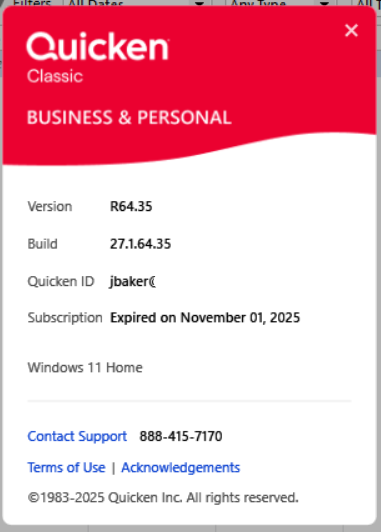
NOTE: I don't know if it makes any difference, but my automatic renewal does not seem to have reached my desktop yet (see image)
Comments
-
but my automatic renewal does not seem to have reached my desktop yet (see image)
Go to Help / Check Subscription Status.
Also try Help / Refresh Sign in.Subscription status should be automatically checked when you run a One Step Update.
I would suggest you run One Step Update at least once a week.
And, if you're not doing so, close Quicken at the end of every day when you're done using it for the day. You want to have Quicken create a backup of your data file as frequently as possible. One can never have enough backups … just in case …
0 -
Thank you, I usually shut it down each time so I'm not sure what's up with that. I'll keep watch though.
0
