Quicken Professional "Make Deposit"

I have tried everything to lump checks into an account named "Undeposited Funds", and then make a single deposit in my "live" bank account as a "single transaction. I am using the "Move" function from the gear icon. Unfortunately, all the checks coming from "undeposited funds" show up as single checks, and not one combined transaction. All the chat Ai tools are telling me to go to the gear icon, and pick "Make Deposit". I cannot find such a function as "Make Deposit". Please explain this to me.
Best Answers
-
The single deposit to your checking account is a transfer-type transaction - a withdrawal from the U-F account with the category as [Checking] thereby creating the deposit. Your use of Move is inappropriate.
0 -
How are you entering the checks INTO the Undeposited Funds account in the first place? You should enter each check as a separate entry into UF account. Then when you make the deposit to your bank account, you make one entry in the Checking Acct for the total deposit amount as a TRANSFER to the UF account. That will clear out the UF acct. That way if you download your bank transactions the deposit will match. You don’t need to make an entry in the UF account.
You don’t want to move the check. That will actually move the original entry to the other account and remove it from the UF account. You need to leave the original entry in the UF account.
I'm staying on Quicken 2013 Premier for Windows.
0

Answers
-
The single deposit to your checking account is a transfer-type transaction - a withdrawal from the U-F account with the category as [Checking] thereby creating the deposit. Your use of Move is inappropriate.
0 -
How are you entering the checks INTO the Undeposited Funds account in the first place? You should enter each check as a separate entry into UF account. Then when you make the deposit to your bank account, you make one entry in the Checking Acct for the total deposit amount as a TRANSFER to the UF account. That will clear out the UF acct. That way if you download your bank transactions the deposit will match. You don’t need to make an entry in the UF account.
You don’t want to move the check. That will actually move the original entry to the other account and remove it from the UF account. You need to leave the original entry in the UF account.
I'm staying on Quicken 2013 Premier for Windows.
0 -
Here's an example of how these transactions should look like (my intermediate account is called "Checks to Deposit"):
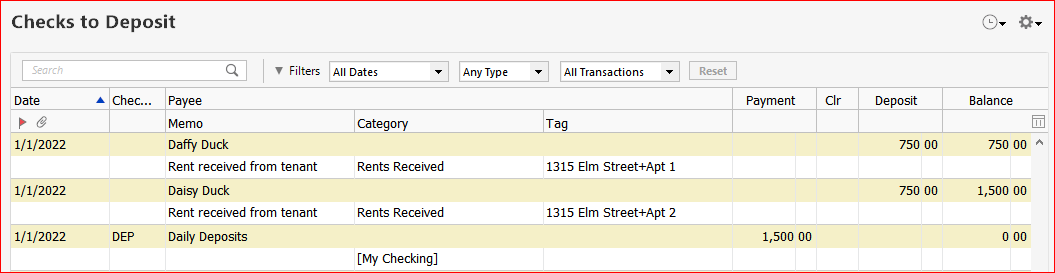
and the [My Checking] account register will show a single matching Deposit transaction of $1,500.00
5 -
To make this work close to what would be a "Make Deposit" function in QuickBooks, was to go to my "live account", select "DEP", enter the deposit amount shown in the Undeposited Funds account, then go to "Category" and select "Transfer" from the "Undeposited Funds" account. That worked! All the checks in the "Undeposited Funds" are now gone away. The balance in the "live account" was increased by the amount in the Undeposited funds account.
I hope I can remember this in the future!!
0

Categories
- All Categories
- 6 Product Ideas
- 34 Announcements
- 249 Alerts, Online Banking & Known Product Issues
- 19 Product Alerts
- 266 Welcome to the Community!
- 301 Before you Buy
- 1.5K Product Ideas
- 55.8K Quicken Classic for Windows
- 16.9K Quicken Classic for Mac
- 1K Quicken Mobile
- 834 Quicken on the Web
- 129 Quicken LifeHub