Income incorrect - not seeing Tax Withholdings

Just starting to play with QMAC for year end and finding a few interesting things I could use help finding or correcting:
- I made several large transfers from Money Market at Bank A to Fidelity Money Market. These are categorized as INCOME and they are not. How can I fix this? Not obvious to me.

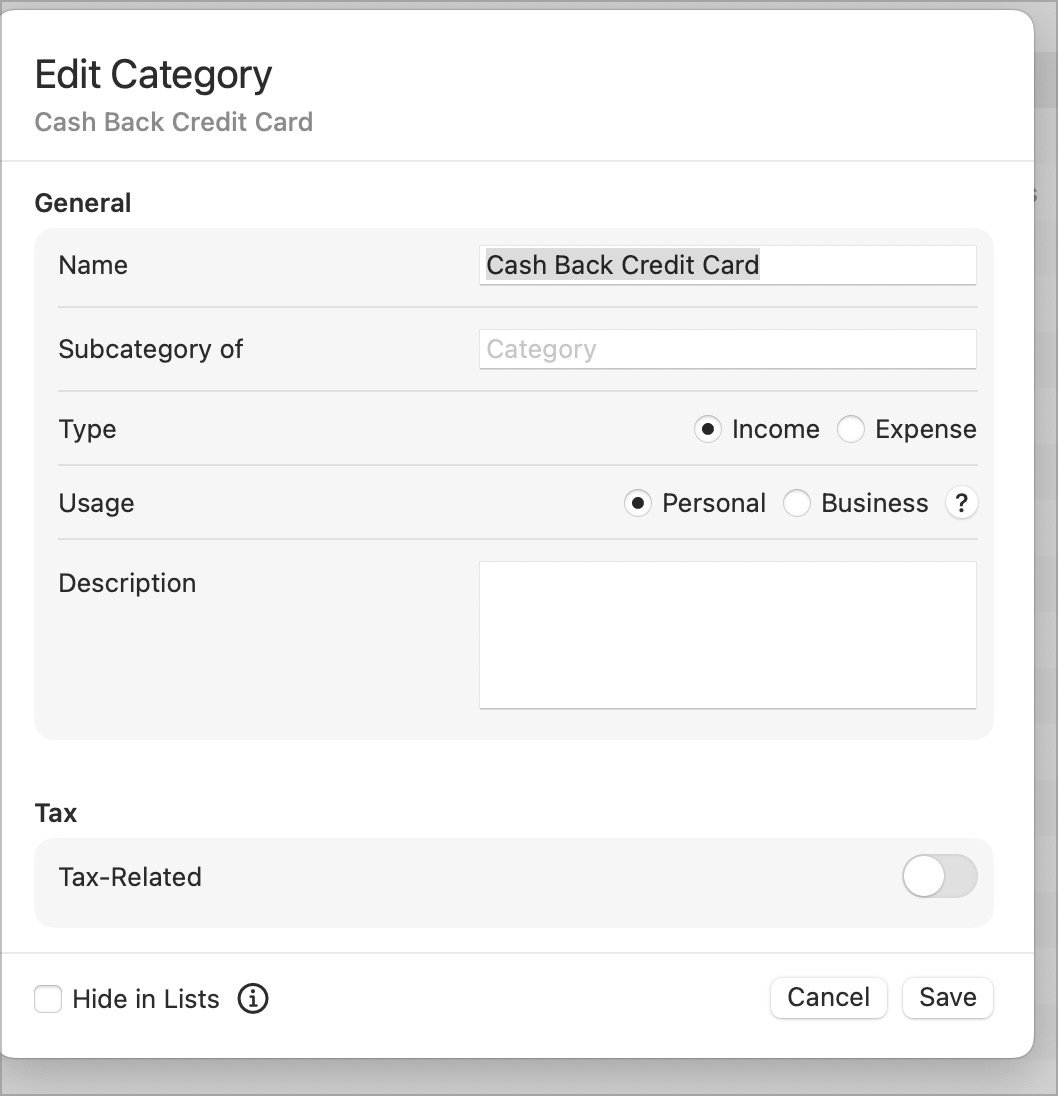
- Credit card cash back is categorized as INCOME as well. How to fix?
- I cannot see any report or other method to show me State and Federal Income Tax withheld so far this year. Where do I find those?
Thanks!
Answers
-
For cash back, I created a Personal Income: Cash Back category and set Tax Related for it to Off.
The Tax Schedule report will show tax payments assuming they were categorized with an appropriate category, but it won't show any taxes paid directly from a tax-deferred account like an IRA.
What are you looking at that shows those transfers as Income?
0 -
Thanks Jon.
So Cash Back, as I suspect, is not taxable for sure? Sounds like a good solution, but surprised there isn't a category for this already.
I'm surprised I have to go to the Tax Schedule and wade to the bottom. However, only withheld there is 2024. None showing for 2025 yet I actually over withheld from my RMD. Need to sort that. And no other place to find YTD withholdings?
Several places show that as income, but Category Summary YTD is one of them. And now that I look at category summary, I see many things there showing as income that should not be. Just ONE small example, the test deposits sent and received when I like an outside bank to Fidelity to do electronic transfers.
So it looks like a LOT to clean up.
So, to avoid the hundreds of things like Medical Expenses which will not meet minimums, is there a place or report to simply show ALL income YTD and all Withholdings YTD?
0 -
I thought editing the existing Cash Back Credit Card to non-taxable would help, but does not seem that can be done.
 0
0 -
Same for many categories showing as income that are not income and Tax-Related is turned off, how to correct these as not income? There are more than I would have suspected.
0 -
I think it would be a mistake to try to convince Quicken that non-taxable income is not income at all. I mean, hypothetically you could assign it to an expense category and show it as a positive expense, but I only do that in rare circumstances (mainly when returning something for a refund).
That screen shot of the "Cash Back Credit Card" category shows that Tax Related is turned off, so it shouldn't show up on any tax reports.
Category reports aren't going to be useful for gathering year-end tax info unless you customize them to only include the specific categories that you know are tax-related. Or you can do what I do and create a tag for each tax year and tag all your tax-related transactions with them, and then customize a category report to only include transactions with that tag. I primarily use that to track tax deductible expenses (medical, charitable, property taxes, etc) but I see no reason for it not to work with income as well.
0 -
Hi Jon.
- I found the withholdings. Foolish oversight on my part.
- Appears I need to somehow correct 27 categories! MOST are those showing as income and should not - at least for any taxable report. There are a few other typwes as well, but getting these would be a great start.
- AHHHH, reading above. let me see if those INCOME are NOT on Tax Reports. That might make more sense for me. - 4 of them do out of many more. So let me look at those.
Helpful. Let me tidy based on that and come back with outliers.
One more tidbit:
I note that Bank A money market shows interest as INTEREST but not appearing as income. Fidelity shows it as Dividends and IS showing it as taxable. One more to look at.
All this tonight trying to decide if I have estimated taxes to pay and the worms are now all over my desk :)
Thanks.
0 -
Found the interest from Bank A.
This has been very helpful. The key for me was that Category Entries, even as Income, do not necessarlity show as TAXABLE Income. So that allowed me to clear most issues.
I think this will be the last stickler I do not yet understand.
RMD is showing as Other income form 1040 as both income and an expense and not under the RMD Category. I cannot figure that one out.
Here is what I believe I did, then screenshots and perhaps you can help with this last one Jon.
I took the RMD from my IRA, withheld, all good. I sent the balance to my Brokerage Account MM fund. So somehow these are incorrect:


Second from Categories / Income.
Thanks so much Jon. Working through a few more and when RMD solved should be done.
0 -
OK, almost got it. I have the proper amount now on RMD, but it is negative!!?
In IRA it is deducting it, so shows as minus for RMD.
In Brokerage Sweep, it is positive but I changed it to CASH DEPOSIT rather than RMD as that was giving me the negative. It seems to me that is proper, but need to make the RMD income and not minus.
All else is done!
0 -
OK, I made the Brokerage deposit the RMD and for the IRA deduction created a new sub category or IRA Contribution: RMD as an expense. Seems to work. All categories up to date. And reports not quite matching QWIN, but useful and close enough for this year for me.
0
