Budget Reports? Where?

I'm new to Quicken for Mac. Iwant to print a 12-month budget report for 2025, a column for Actual, a column for Budget, and a column for Difference.
How?
Quicken Classic Deluxe, V 8.3.3 MacOS 26.1
Answers
-
Are you asking for a consolidated budget where you have the entire year summarized into a single set of columns? If so, then what you're looking for is the Summary Budget. Go to the Budget tab, set the date in the upper left to January 2025, and click on the Print button in the upper right and select Print Summary Budget, and you'll get all of 2025 summarized into a single set of columns. You can also select Print Full Budget and it will break out the individual months.
0 -
That appears to be what I need? Now if I can only find how to designate categories to print and not to print.
0 -
I don't think you can control the printout that way. You would have to edit the budget and exclude those categories entirely to get them removed from the printout.
0 -
I don't know if this will help, but you can always duplicate your existing budget and remove the undesired categories from the copy. Both will track accordingly, and you always have one ready to present to others if needed.
The only caveat is that if you modify budget goals for the shared categories, you will have to update both budgets accordingly.
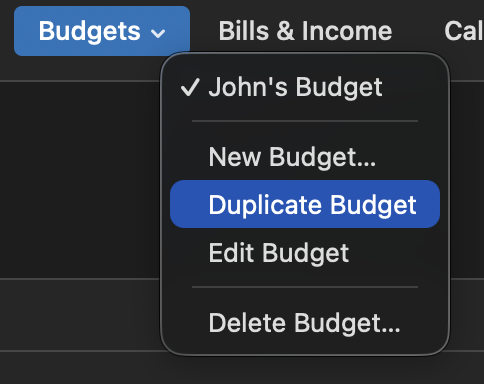 0
0
