Quicken Mac 8.4.2 Register CLR Column - blue square

RedWagoner
Quicken Windows Other Member
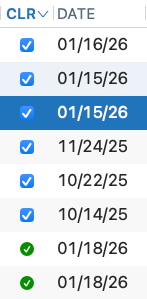
Please help me understand how the blue square in the register's CLR column is to be interpreted and used.
I've spent a fair amount of time searching help and am failing to find info.
Thanks, Paul!
0
Answers
-
A blue check mark in the CLR column means the transaction has cleared. If the account is set up to download from the bank then it would mean the bank has reported it as a cleared transaction; you can mark transactions as cleared manually by simply clicking on the empty box.
A green check mark means the transaction has been reconciled. Usually you will do this by reconciling the account to your monthly statement or to the online balance. You can also hold down the Option key and left click on a cleared transaction to change it to Reconciled.
0
This discussion has been closed.