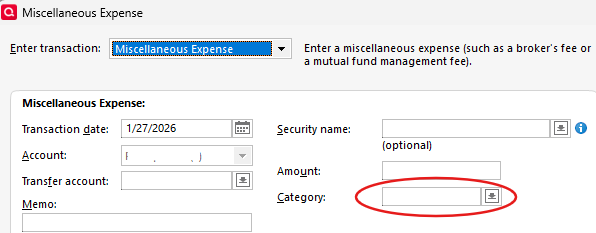
I have 2 brokerage accounts.MiscExp at Schwab is fine, at State St Bank the entry disappears

The Quicken (Windows license) setup is I think identical. In a report the Schwab entries are "Bank Charge" which is correct. The State St. Bank entries do not appear in a report.
Answers
-
One possible reason for this is that the category field is blank. In the State St account, use the same category (Bank Charge?) as your Schwab. Please post back if that was the case and resolved it.
- Q Win Deluxe user since 2010, US Subscription
- I don't use Cloud Sync, Mobile & Web, Bill Pay0 -
In all cases I had bank fee as the category.
0 -
You did say that the State St account is a brokerage, right? Meaning it is under the Investing section of Quicken?
One last thing to try: When you run the report, at the top play with the "Subtotal by" field and change the selections, such as "Subtotal by: Category" etc. and see if that makes a difference**. If not, then I am out of ideas, sorry. If you don't receive other responses I suggest to contact Quicken Support.
** Why should that make a difference? I have seen entries in my reports disappear for certain "Split" transactions (a bug) and changing the "Subtotal by" field corrects it. But since the Investing accounts do not have the Split capability that bug should not surface.
- Q Win Deluxe user since 2010, US Subscription
- I don't use Cloud Sync, Mobile & Web, Bill Pay0 -
I greatly appreciate your help.
0

Categories
- All Categories
- 18 Product Ideas
- 34 Announcements
- 246 Alerts, Online Banking & Known Product Issues
- 19 Product Alerts
- 518 Welcome to the Community!
- 682 Before you Buy
- 1.5K Product Ideas
- 55.7K Quicken Classic for Windows
- 16.8K Quicken Classic for Mac
- 1K Quicken Mobile
- 834 Quicken on the Web
- 127 Quicken LifeHub