Ever since 1/1/26, the budget view does not open to the current month view. (Q Mac)

I am on macOS 14.8.3. Quicken version 8.4.2. Starting on 1/1/26, when I click on budget, the opening view is for 1/1/25. The same thing is happening for February — opening budget view is for 2/1/25. The only way to get to the current month's budget view is to click through the forward arrow in the budget view 12 times. Is anyone else experiencing this? Is there a way to fix it so that the current month's view is the default opening screen?
Answers
-
Yes, I have seen this, and the setup for next year's budget is a bit convoluted.
Make sure you are looking at the budget in the 12 month view, and click on reset date so that it shows 1/2025. Then, click on the the date up arrow:
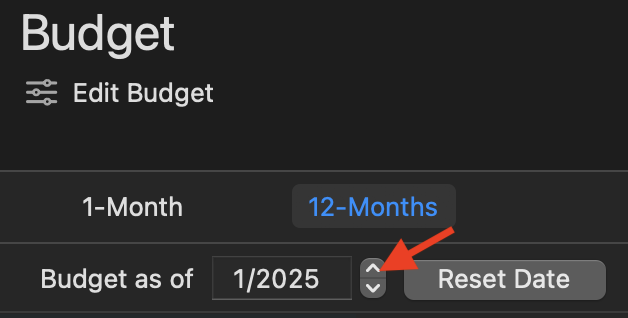
Then, click on the up arrow again in that window:

This should present the dialog to prepare your 2026 budget:
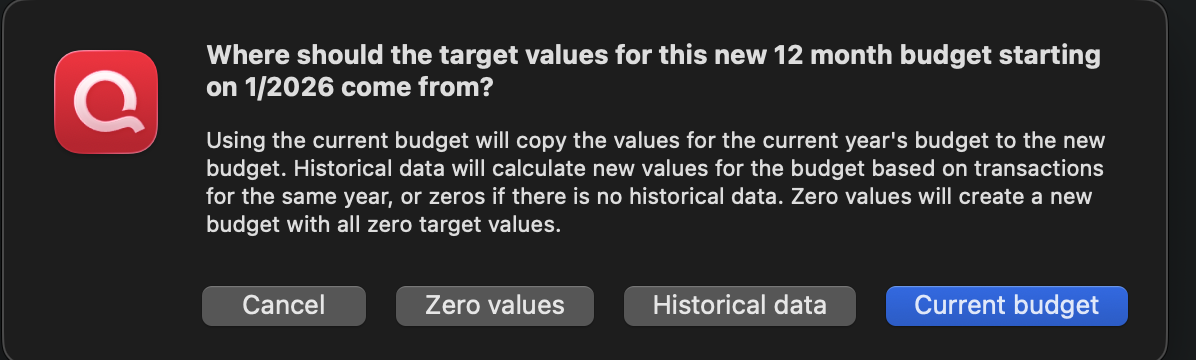
That should get your 2026 budget setup.
1 -
John — thanks for the response. I tried your steps and that does not seem to be working for me. When I open the 12 month view, my as of date is 10/2024. I went through your steps a few times and cannot get the setup dialog box for the new 12 month budget to come up. My budget is currently setup through October 2026, so part of 2026 is already configured. I would assume that I won't be able to set up a new 12 month budget until October 2026.
0 -
Thanks for the update. I don't know if all of this is working as intended as the budget has mostly been put on the back burner with the intent is to revamp it as the last major one was circa 2016.
I have seen the issue where you can't get the dialog to setup choose the #s for next year's budget. I found that if I didn't do the up arrow trick in the prior year. Yet, I can do it in older test files, but I don't know if that is because I didn't already have transx in the next budget year. In my case, it just rolled forward one year with last year's #s. Being aware of this, I was able to get that dialog if I created my 2026 budget in late Dec 2025.
Do you really want your budget year to start in October? That might makes sense for a business, but less so if personal finances. If you want 1/1 as the start of the new budget year, you might wish to simply create a new budget (you can have as many as you want) and set things up anew with January as the starting month.
0 -
It doesn't really matter when my budget starts because I change it as things change with the finances. I decided to try the budget feature in October 2024 and just keep adjusting as time goes on. I did set up a new budget for the new year in October, so I don't think it matters which month you start in (and it shouldn't). It has always defaulted to the current month's view until recently. i really feel that this is a bug in the code. I am going to send my details to the development team.
0

Categories
- All Categories
- 18 Product Ideas
- 34 Announcements
- 246 Alerts, Online Banking & Known Product Issues
- 19 Product Alerts
- 518 Welcome to the Community!
- 682 Before you Buy
- 1.5K Product Ideas
- 55.7K Quicken Classic for Windows
- 16.8K Quicken Classic for Mac
- 1K Quicken Mobile
- 834 Quicken on the Web
- 127 Quicken LifeHub