FSA accounting

There have been a lot of discussions on FSA accounting but they are all closed. For making an expense outside of my FSA card, it is been suggested to enter the reimbursement into my FSA account and transfer that to whatever expense account I used. The problem is I am depositing the reimbursement check ito my checking account. If I list the reimbursement in my FSA account with a transfer, the transfer to my checking acct shows as a negative number, not a positive one. If I list the reimbursement as a deposit into my checking account with a transfer to FSA it shows up as a negative in my FSA acct.
I have already listed the expenses as deductions from my FSA so now the transfer is also an expense. Should I just make a second entry to zero it out? That way my checking account still shows a deposit and the original expenses are properly categorized. Hope my question makes sense. Thanks
Comments
-
I created an FSA (Flexible Spending Account) account in Quicken. This is a savings account. In my case, credits to the account came from my paycheck. Debits to the account were distributions from the FSA. So, when you get a reimbursement deposited to your checking account, this would be coded as a debit to the FSA account. There's no "second entry". This is not a duplicate expense. Expenses would not be coded directly to FSA. Expenses are paid by bank accounts/credit cards, etc.
0 -
I have taken an unconventional approach: (a) I didn't create an FSA account in Quicken at all. (b) The FSA amount from paycheck go into the _FlexContrib which is a pre-existing Quicken category. (c) I pay my expenses with my personal credit card (not the one that the FSA company sent me). (d) then once a year or more frequent I submit all my expenses and they send a direct deposit into my bank account.
So the medical expenses are properly categorized in our personal credit card accounts - as normal. Then when the FSA deposit hits my bank account, I categorize it as FSA and make a consistent note in the memo fields that I can easily track, filter and report on. My FSA related transactions looks like this:
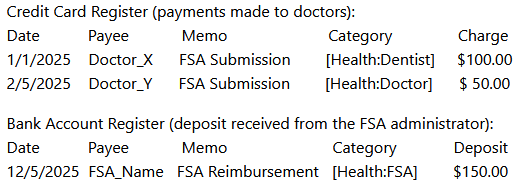
With this approach, instead of creating yet another account in Quicken for the FSA purpose, I created one category within Health:FSA. Then I run a report for the entire 'Health' parent category with the memo containing 'FSA'. Optionally I can use the 'Income & Expense by Category' report to track how much the _FlexContrib category is funded.
- Q Win Deluxe user since 2010, US Subscription
- I don't use Cloud Sync, Mobile & Web, Bill Pay0 -
I only enter the medical expense in the spending account I used to pay it. If it was not taken directly from your FSA account it should not be entered there. When I submit for reimbursement I enter it as a deposit into my Checking account with the FSA account as the Category. It then shows as a transfer out of my FSA account.
You should not enter the expense twice in two different accounts because they will both show in you Category totals. The entries in your FSA will then match your FSA statement.
0

