Hidden accounts problem

This is kind of a "Once upon a time . . ."
In mid July, my bank changed the software and I was forced to re-engage (don't know how else to describe it). About 4 days after they changed everything, I entered the hospital and rehab for about 2.5.months. During the interim my son was trying to make the payments that were due. Anyway, Quicken. or him, seems to have swung back and forth between the old set-up and the banks new set-up. I should say that when they changed and I had too set it transfer up, the transaction created a new account.
I did some reading in the Help files and found out about "Hidden Accounts." Just the ticket I thought The new display had all of the checks/deposits so I thought I could just hide the old accounts and press on.
But something seemed amiss and after watching it closely, I realized that when I would start, sometimes I would be in the hidden account though not always. How do I get the "Hidden Account" to never appear unless I actually want them, I frankly don't know why I would since the bank sent me the 12 or so years worth of checks during the conversion., So…. how do I truly hide this account while keeping it possible to look a it but impossible to transact within it?. The problem is that I did have a few instances where I had written a note about something regarding the transaction but these are scattered so I can't just copy them to the new format
I looked at the "Managing Hidden Accounts" option on Tools menu but it seems a little unclear. I have all of the "old" accounts checked and the help screen says that they would not be available for transactions but they are.. The only thing I have not tried is to "Close the Account". The warning scares me. .
Answers
-
On the Account Details → Display Options tab, do you have "Hide in transaction entry lists" checked as well as "Hide account name in account bar and account list" checked? The second one only removes it from your dashboard/view by default, but keeps it available in your payee/transfer list. The first one will make it so you can't select it as a category.
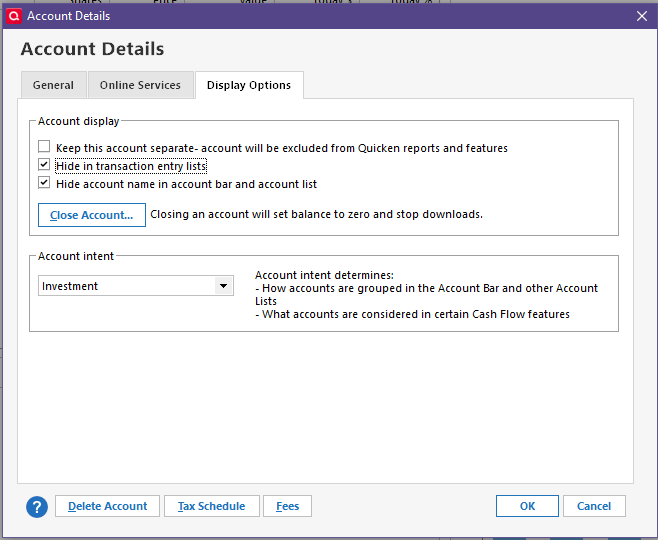
If that's selected and you're still having the issues, I'm sorry I don't think I have any other suggestions.
0 -
Well. I guess I'll just leave it as is for now. An account that I used your mentioned scheme with disappeared. I tried various tries at finding it again and finally found one that worked. Part of the problem is that the bank used account names that were close but different from what I had used in the past. The result was that after trying various settings I was getting confused. I've got it back to where it was and so will leave it be for the moment. Thanks.
0