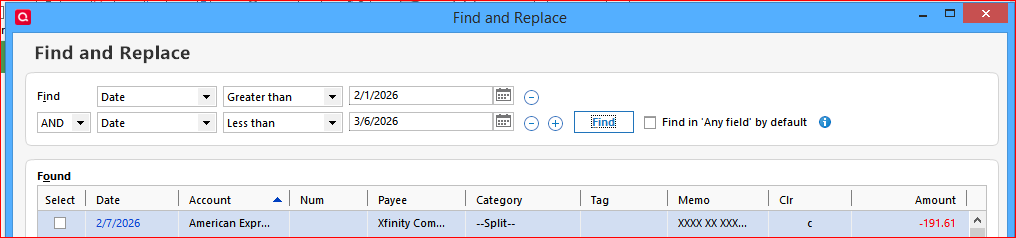
Find and Replace should support a date range

But when working with long list of found transactions, it's easier to work on a small batch a time - especially when having to scroll through the list checking transactions where you want Replace applied.
After Replace function is applied, the list is refreshed back to the top. User has to scroll down to find where they left off. This can be a painful process when working with a long list. If a custom date range, or even just a start date, can be selected, it's easier to go through a subset of transactions to work with. Example: display defaults earliest to recent. One might choose to do 6 months a time. After the first Replace is applied, change the start date to 6 months later so the start of the list is, once again, only transactions you need look at - not the entire list again and again.
Comments
-
Have you tried this?
 1
1 -
No. I don't see an "AND" option that lets me add different selection criteria. (I'd like to find based on Date and Category). Quicken recently did an update so I believe I'm running the latest version R66.23 27.1.66.23 Is there a setting to allow multiple criteria?
Thanks for the info!
0 -
There was a not-so recent change to Find/Replace which added this feature.
Look for the small (+) and (-) blue circle icons in the Find line. You can add multiple selection criteria using AND and OR logic.Also see Find and Replace (quicken.com)
1 -
Duh me! I found it. Thanks so much for the replies
0

Categories
- All Categories
- 6 Product Ideas
- 34 Announcements
- 250 Alerts, Online Banking & Known Product Issues
- 19 Product Alerts
- 265 Welcome to the Community!
- 301 Before you Buy
- 1.5K Product Ideas
- 55.8K Quicken Classic for Windows
- 16.9K Quicken Classic for Mac
- 1K Quicken Mobile
- 834 Quicken on the Web
- 129 Quicken LifeHub