Downloading Transactions from Bank of America

I have given up on waiting for Quicken/BoA to fix the current issues with regard to account re-authorization and using automatic download feature. That is broke and apparently will never be fixed. Fine. Now, I am trying other methods. I went to Bank of America account on Web and tried manually downloading my Checking and Savings account transactions, but it came up with a message that said downloading Quicken type transactions is No Longer Supported. I am now looking at changing my Bank to another one that supports Quicken. Any suggestions? Thanks in Advance.
Comments
-
Based on what I'm reading here in the Community on other discussions related to BofA, their conversion appears to be progressing nicely, sort of …
The important thing is that you need to stop using the old "Bank of America - All other states" connection and/or any other BofA bank name now prefixed with a "zzz-"
Disconnect / deactivate all your BofA accounts.
Using Tools / Add Account pretend you're adding new accounts to "Bank of America"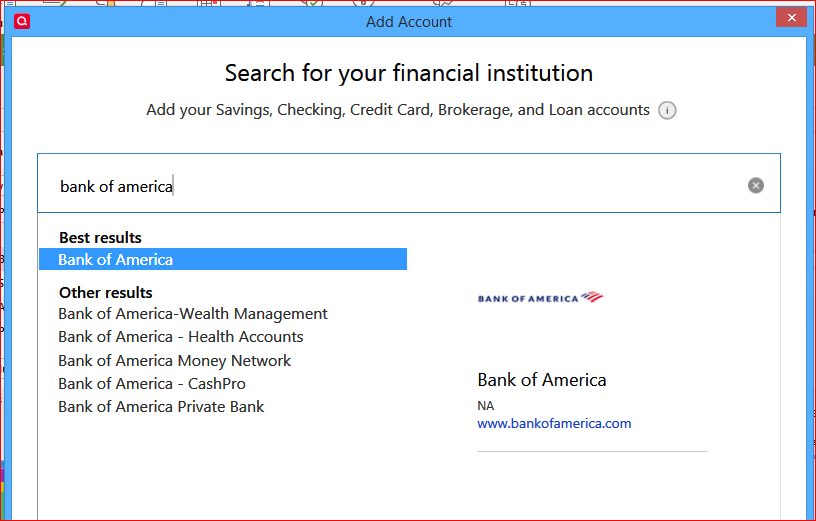
Select the entry shown above and follow procedure to enter your ID and password.
When you get to the list of accounts found at the bank, be sure to select LINK instead of ADD to link each of your accounts to the already existing account register.That should get you reconnected and download a bunch of recent transactions, for you to review and process.
Edit: Oops, I just noticed that you're a Quicken for Mac user. The process for you to use to reconnect should be similar to what I described. Sorry about any confusion.
0 -
No, problem. With Quicken for Mac, the process is somewhat different but similar end goal. Goal is to re-authorize Quicken (Mac) for third party access with BoA. When we get to the step "Select the entry shown above and follow procedure to enter your ID and password." The process halts for an error and you can't proceed. So never get to the list of account found at the bank. So, never get to the subsequent step where using LINK instead of ADD. The process as already tripped out 2 steps before this, unfortunately. But, thank you very much for your information. I appreciate it greatly. Now, My question in this post was what recommendations do people have for selecting a NEW bank as I believe the Quicken ←→ BoA issue will never be solved for reasons I can't get into here. And BoA has recently dropped support for manually downloading / exporting transactions in Quicken Format from BoA accounts. This blocks all Quicken ←→ BoA interoperability.
0
