Transaction appearance in CC register

when downloading the CC transactions into the set up CC account register, does it read:
Date: number: transaction paid to: amount: credit : total
In the old quickbooks pro, the " transaction paid to" was blank that you had to click on it to see were the payment went to.
The new quickbooks pro now it loads into the register when downloading. Is quicken this way to?
Thanks
Best Answer
-
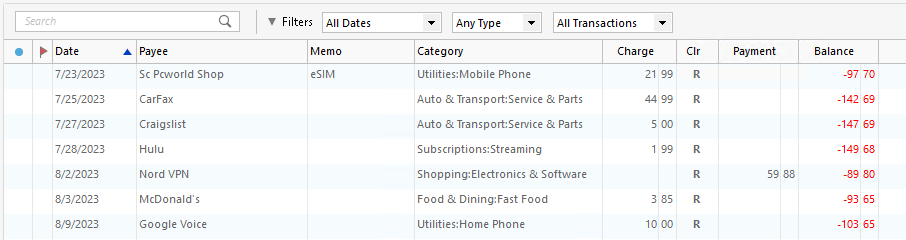
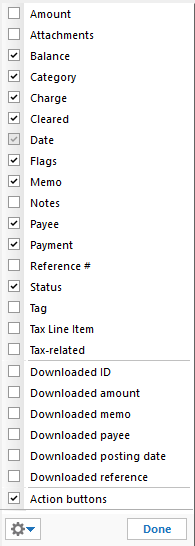
Maybe an image is best to show you what is displayed. Here is what I have 'chosen' to display in my CC register. And the image after that shows a complete list of available fields I can select/un-select to display in the CC register. Happy to show you more examples so please feel free to ask.
ADDING: This is on the Windows desktop platform.
- Q Win Deluxe user since 2010, US Subscription
- I don't use Cloud Sync, Mobile & Web, Bill Pay1

Answers
-
Maybe an image is best to show you what is displayed. Here is what I have 'chosen' to display in my CC register. And the image after that shows a complete list of available fields I can select/un-select to display in the CC register. Happy to show you more examples so please feel free to ask.
ADDING: This is on the Windows desktop platform.
- Q Win Deluxe user since 2010, US Subscription
- I don't use Cloud Sync, Mobile & Web, Bill Pay1 -
On your second question
The new quickbooks pro now it loads into the register when downloading. Is quicken this way to?
I don't know Quickbooks, but in Quicken you have the option of turning the "Automatic Entry" on/off. Meaning when the transactions download
- They can either go into a holding place (called Downloaded Transactions) allowing you to review and Accept them, at which time they get moved into the register.
- Or they can go immediately into the register, skipping the holding place. However, there is still a status indicator to show you the newly downloaded transactions.
And you can set that option on each individual account or universal: I have decided to have all of my banking transactions automatically go into the register upon download. But for my investment accounts, I would like them to go into the holding place first so I can review them one at a time before accepting them.
Again this is all on the Windows platform. (thanks @Jon )
Does this answer your question?
ADDED the items in italics.
- Q Win Deluxe user since 2010, US Subscription
- I don't use Cloud Sync, Mobile & Web, Bill Pay0 -
With Quicken Mac, new transactions go directly into the account registers (but get flagged as new in the Status column so you can review them). There's no option for an intermediate holding place like with Quicken Windows.
No issues seeing the payees on new transactions.
0 -
Thanks for the post. Answered my question perfectly.
1