This discussion was created from comments split from:
SchoolsFirst FCU: FDP-102.
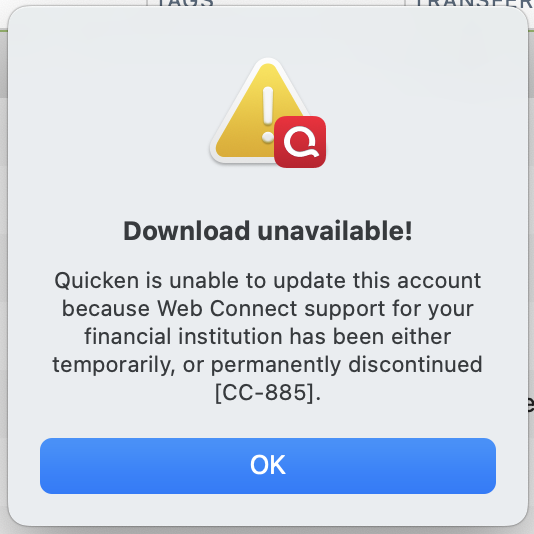
I can understand the occasional issue connecting to my bank with Web Connect, and I've been patiently waiting for the FDP-102 fix. But in the meantime, why would that prevent me from downloading my transactions from SchoolsFirst as a QFX file and importing them into Quicken?!
It makes zero sense to have these two processes so tightly coupled. Even the error message is misleading, since all I did was select 'File —> Import —> Bank or Brokerage File' before selecting my LOCAL file, completely bypassing the live connection attempt.
Please ask your engineering team to decouple the QFX import process from the Web Connect service. A local file import should always function as a reliable, independent fallback when live connections fail.
Again, this is the message I get when trying to manually IMPORT, not download! The only option available now is to type every transaction individually.
Hi @Scott BJ, Thanks for reaching out to the Quicken Community!
This message is typically displayed when a financial institution discontinues its connected services in Quicken (the most common cause) or when the service is no longer available, such as after a merger with another bank.
To better understand the issue, I have a few questions:
I look forward to your reply!
Thanks @Quicken Carlos but you've made my point and I wish you hadn't split off this topic into a separate thread. I think the upload issue is related to the web connect FDP-102 issue. As you said, "This message is typically displayed when a financial institution discontinues its connected services in Quicken". That should never occur during a manual file upload because it should not be checking the financial institution at all.
I presume when SchoolsFirst issue (Ticket #12369784/CTP-17082) is resolved, this might be as well. But the manual upload process should be an alternative method and not dependent on connections status of the financial institution.
To answer your questions:
The problem now that you have split the conversation is that we can't tell if the others are also experiencing the same issue during the SchoolsFirst downtime. I know there are design issues based on the error messages alone. An "upload" should never trigger a "download" error message (CC-885).
If you resolve Ticket #12369784/CTP-17082 and the manual upload issue goes away, then you will prove the two processes are too tightly coupled.
Hi @Scott BJ,
Thank you for your reply, for following up, and for answering the previous questions. I can understand why this behavior would be confusing.
While a manual QFX import is intended to be an alternative to downloads, Quicken may still associate the imported file with an existing financial institution profile in your account.
It’s possible that the issue is related to the FDP-102 error, as these are different types of connection errors. I recommend reviewing our support article on CC-885 for more information. I suggest waiting 24 hours and trying again. If the problem continues, I recommend contacting Quicken Support for further assistance. They can guide you through additional troubleshooting steps in real time or escalate the case if necessary.
Phone support is available Monday through Friday, from 5:00 AM PT to 5:00 PM PT.
I hope this helps.
Hi @Quicken Carlos. It's not confusing, and your documentation for CC-885 proves the defect. Looking closely at the "Web Connect" details on that page, there are two key lines that confirm the process doesn't allow a simple, offline file import:
Even though you are manually downloading a file from your bank's website, that file (.QFX) contains a specific Financial Institution identifier. When you attempt to import that file, Quicken doesn't just read the raw data; it checks that embedded identifier against its own systems to verify that the bank is currently an active, authorized, and paying partner.
Because of this gatekeeping mechanism, if the bank's profile is down, suspended, or experiencing a server-side outage within Quicken's ecosystem, the software will reject the manually downloaded file and return an error. The import relies on Quicken validating the bank's "partner" status behind the scenes, meaning a disruption there will block your ability to import the file entirely.
That's why I'm getting an error; the FDP-102 error has suspended the relationship. My entire point is "What is the backup plan?" If the system is down, I should still be able to upload my transactions manually. This is a design flaw in the system.
Thank you for your reply.
After further research, we found that the CC-885 error is related to the CC-502 open alert.
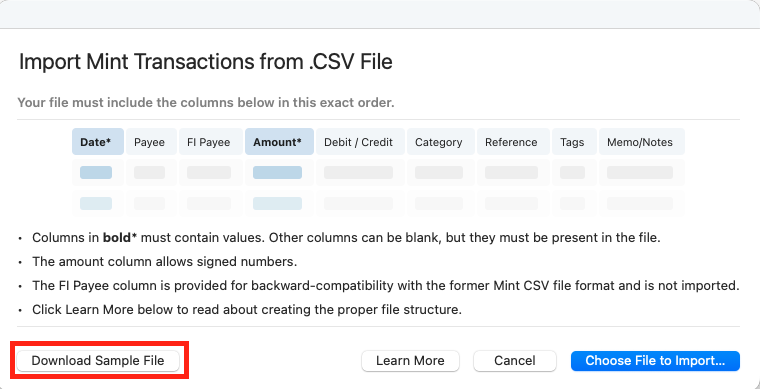
In the meantime, as a workaround, if your bank connection continues to return errors, you may be able to import transactions using a CSV file.
There is a required format for the CSV file:
Required file format The file must contain the first seven comma-separated columns in exactly this order to be processed. The last three columns are optional, but if included, they should appear in this order:
Date, Payee*, FI Payee, Amount*, Debit/Credit, Category, Account*, Tag, Memo, Chknum
Columns marked with * must contain data in each row. The remaining columns can be left blank, but their position must still be included in the file.
You can also download a sample file by following these steps:
For more details, please refer to our support article on importing transactions from a CSV file.
I hope this helps!