Community Homepage
Discussions
Categories
Quicken for Mac
Quicken Lifehub
Quicken Mobile
Quicken on the Web
Quicken for Windows
Support
Quicken Classic
Quicken Simplifi
Getting Started
Community Training FAQs
Using and Improving the Community
Connect and Engage
Announcements & Alerts
Announcements
Alerts, Online Banking & Known Product Issues
Product Ideas
Beta
Home
Quicken Classic for Windows
Errors and Troubleshooting (Windows)
OSU Issues: Recent upgrade to "improved cloud services" broke OSU
Paul Smith2
This morning when I did a OSU, there was a message that Quicken was moving to an 'IMPROVED CLOUD SERVICE" and there might be a delay. This was a one time issue. Sure enough, there was a delay while the conversion took place. Trouble is that after the conversion, my bank (BMO) seems to have dropped off. Doesn't work anymore. Furthermore the update billing action also hangs. Finally times out with an error message relating to the fact that "budget was not synced" -- which is a known problem.
Anyone else seen this problem? Found a workaround??
Paul
Find more posts tagged with
Online Banking
Accepted answers
Quicken Anja
Hello
@Paul Smith2
,
Thank you for reaching out to the Community and telling us about your issue, though I apologize that you are experiencing this.
Could you please provide which version of Quicken you have currently running?
Help > About Quicken
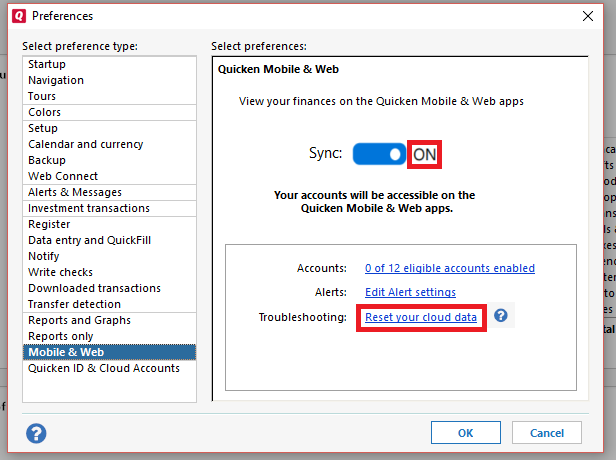
First, I recommend that you try to
reset your cloud data
by following the steps below.
Go to
Edit
Preferences
Mobile & Web
Make sure sync shows is
ON
and click on
Reset your cloud data
(
see below
)
Once that is done, see if the issue still persists.
Let us know how it goes!
All comments
Quicken Anja
Hello
@Paul Smith2
,
Thank you for reaching out to the Community and telling us about your issue, though I apologize that you are experiencing this.
Could you please provide which version of Quicken you have currently running?
Help > About Quicken
First, I recommend that you try to
reset your cloud data
by following the steps below.
Go to
Edit
Preferences
Mobile & Web
Make sure sync shows is
ON
and click on
Reset your cloud data
(
see below
)
Once that is done, see if the issue still persists.
Let us know how it goes!
Paul Smith2
I disconnected the bank connections that broke on the OSU and attempted to set them up again. That effort did reconnect the broken links, but I kept getting a message back from the resetting cloud data that "the budget wasn't synced". That problem was finally resolved by restoring a previous data file from 2 weeks ago (10/27/2020). I gave the customer service agent the highest rating in the survey because he stuck with me for 2 hours while the problem was finally resolved!
Quicken Anja
Thank you for the update! I'm glad to hear you got it working again.
Quick Links
All Categories
Recent Discussions
Activity
My Bookmarks
My Discussions
My Drafts
Unanswered
Best Of