So, I am using Quicken 2020 R30.21 and performed a One Step Update on 01/20. In one of my investment accounts with American Funds, it showed that I had a purchase performed. I reconciled the transaction, but then got a message that my share balance is incorrect. When I go to the Reconcile Shares option, Quicken is showing that I have less shares than it actually shows in Quicken.
It appears that Quicken is not accounting for the most recent transaction in Quicken when it displays the amount of shares that I own. Attached are some screen shots that show that the Quicken balance (and Brokerage balance) are correct, but Quicken does not seem to think so.


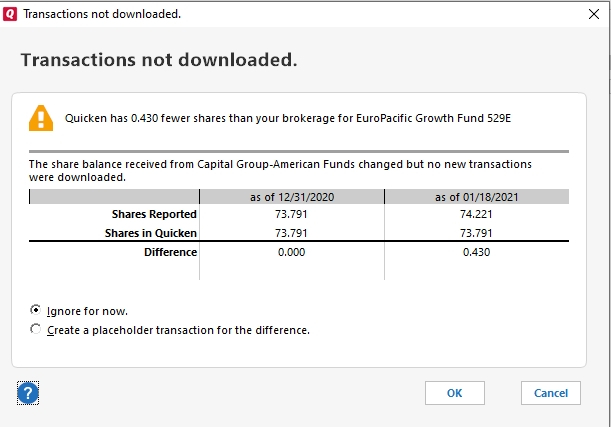
Sorry, if the first screen shot is hard to read, but it does show that my last transaction was on 01/19 for a purchase of 0.430 shares and the share balance is 74.221. I am not sure why the one screen is stating that transactions are not downloaded. I downloaded transactions right before I checked this and it downloaded the transaction for 01/19.
I am seeing that the chart is showing shares as of 01/18 for some reason and not displaying it for as of 01/19 even though it is after midnight here on 01/20. Maybe that is the reason is thinks the shares are off since it is not including 01/19, but not sure why it would not include 01/19.
Any thoughts would be appreciated.
Thanks,
Merg

