Community Homepage
Discussions
Categories
Quicken for Mac
Quicken Lifehub
Quicken Mobile
Quicken on the Web
Quicken for Windows
Support
Quicken Classic
Quicken Simplifi
Getting Started
Community Training FAQs
Using and Improving the Community
Connect and Engage
Announcements & Alerts
Announcements
Alerts, Online Banking & Known Product Issues
Product Ideas
Beta
Home
Quicken Classic for Windows
Paying Bills, Online Billers & Reminders (Windows)
Why does USAA not permit scheduling a credit card payment for a future date when using Quick Pay?
carlj07
Of all the billers I have, USAA is the only one that does not permit scheduling a credit card payment for a future date when using Quick Pay. Instead, when Quick Pay is selected, it must be only for the current date. Does anyone know why payments to a USAA credit card cannot be scheduled for a future date?
Find more posts tagged with
Bill Payments
Accepted answers
Quicken_Tyka
Hello
@carlj07
Thank you for giving those steps a try, although I apologize that you are still unable to schedule the payment at a further date.
The message does state that it is the biller, (USAA) that is requiring a specific date. The allowed payment date is dictated by the biller and we do not have any additional settings or options to change it at this time.
I would recommend opening Quicken and navigating to Help > Report a Problem to provide feedback on this issue.
I apologize for not having better news or a solution to this at this time.
-Quicken Tyka
All comments
Quicken_Tyka
Hello
@carlj07
Thank you for taking the time to visit the Community to ask your question, although I apologize that you have not received a response.
When attempting to schedule a payment do you receive an error message when attempting to schedule at a later date? If so, what is the exact message?
If you attempt to make the payment using the register? Do you get the same result?
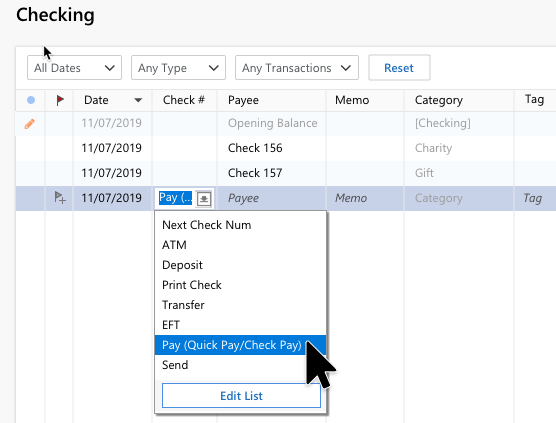
To make a Quick Pay payment from the register, enter a new transaction with the desired date and choose the option shown above from the Check # column.
Please let me know what you find!
-Quicken Tyka
carlj07
Thanks, Quicken Tyka for the suggestions. The so-called error message occurs regardless if I am making a payment from my register or from the Bills & Income tab using Quick Pay AND it only occurs with USAA (all my other Quick Pay billers allow me to schedule a payment for a future date).
I attached a screenshot showing the issue - when I attempt to make a payment to USAA on a date other than today's date (3/13/2021), the message "Biller requires a date of 3/13/2021 or earlier" is given (in red), preventing me from scheduling a payment to USAA for a future date.
Is this a Quicken issue or a USAA issue?
Screenshot 2021-03-13.jpg
Quicken_Tyka
Hello
@carlj07
Thank you for the response and the screenshot. As a test, can you please change the category from a transfer to a non-transfer category?
I am curious if the transfer is preventing the transaction form from being scheduled further out.
Please let me know!
-Quicken Tyka
carlj07
Hi again, Quicken_Tyka;
I did as you suggested - same result - included a screenshot again. From my register, when I select Pay(Quick Pay/Check Pay), a pop-up list appears listing all of my Quick Pay/Check Pay payees. As soon as I select USAA Credit Card Payments and select the Pay button, the pop-up window appears (same as screenshot) with the message "Biller requires a date of 3/13/2021 or earlier" (today's date) in red. Changing the category to a non-transfer category had no effect on the date issue.
I'd be happy to continue to troubleshoot with any further suggestions you may offer. Thank you.
Screenshot 2021-03-13 141046.jpg
Quicken_Tyka
Hello
@carlj07
Thank you for giving those steps a try, although I apologize that you are still unable to schedule the payment at a further date.
The message does state that it is the biller, (USAA) that is requiring a specific date. The allowed payment date is dictated by the biller and we do not have any additional settings or options to change it at this time.
I would recommend opening Quicken and navigating to Help > Report a Problem to provide feedback on this issue.
I apologize for not having better news or a solution to this at this time.
-Quicken Tyka
Ed13
[removed - rant/unhelpful]
Quick Links
All Categories
Recent Discussions
Activity
My Bookmarks
My Discussions
My Drafts
Unanswered
Best Of