New error message Navy FCU

Greg Brown
Greg Brown Quicken Windows Subscription Member ✭✭✭✭

I've never seen this error before…

image.png

Quicken Classic - R65.17, Windows 11 PRO current on updates

My data file is NOT being synced nor backed up.

Comments

  • Greg Brown
    Greg Brown Quicken Windows Subscription Member ✭✭✭✭

    What is going on with these NEW errors??

    image.png

    Quicken Classic - R65.17, Windows 11 PRO current on updates

    My data file is NOT being synced nor backed up.

  • Greg Brown
    Greg Brown Quicken Windows Subscription Member ✭✭✭✭

    Had to Reset and Reauthorize…

    Quicken Classic - R65.17, Windows 11 PRO current on updates

    My data file is NOT being synced nor backed up.

  • Quicken Jasmine
    Quicken Jasmine Quicken Mac Subscription Alumni ✭✭✭✭
    edited February 25

    Hello @Greg Brown,

    Thank you for coming back to update us, I am happy to hear that you resolved the issue.

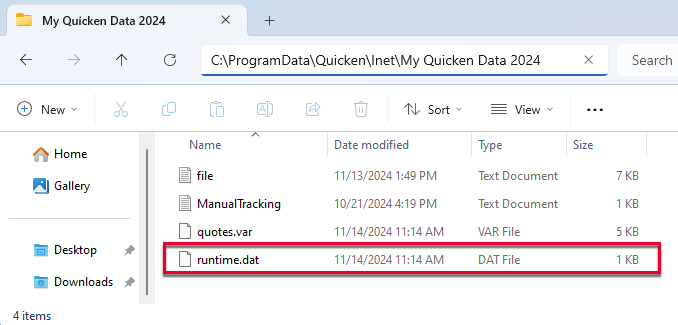
    I do want to let you know that our teams are currently investigating this and are working on getting it resolved. However, our development team also believes that this is a problem in the runtime.dat file, and recommends the following steps below to correct this issue:

    1. Rename the runtime.dat file found at C:\ProgramData\Quicken\Inet\FILENAME\. (For example, add a 1 at the start of the file name, so that it reads 1runtime.dat.)

    QWin

    2. Run a One Step Update (OSU) again to confirm the issue is resolved.

    Note - The Program Data folder is hidden by default. If you need instructions on unhiding the folder, you can find instructions on Microsoft's support site.

    Thanks!

    -Quicken Jasmine

    Make sure to sign up for the email digest to see a round-up of your top posts.

This discussion has been closed.