Alliant often doesn't allow downloading before noon ET but for the last few days it's not succeeded in downloading at all and shows a different message (attached).
Hello @Steven,
Thank you for reaching out with this issue!
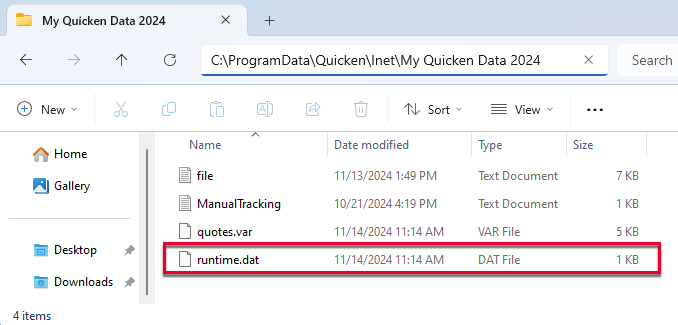
I do want to let you know that our teams are currently investigating this and are working on getting it resolved. However, our development team also believes that this is a problem in the runtime.dat file, and recommends the following steps below to correct this issue:
1. Rename the runtime.dat file found at C:\ProgramData\Quicken\Inet\FILENAME\. (For example, add a 1 at the start of the file name, so that it reads 1runtime.dat.)
2. Run a One Step Update (OSU) again to confirm the issue is resolved.
Note - The Program Data folder is hidden by default. If you need instructions on unhiding the folder, you can find instructions on Microsoft's support site.
Thanks!
I got a different message. Would be helpful if the times were filled in.
Thanks for joining the thread. I'm sorry to hear you're experiencing this issue as well.
While the error message details you received are different, the instructions I provided earlier still apply. Please give them a try.
Thanks Jasmine!
I got the error message that @mvwabc received.
Renaming the runtime.dat filename worked. It required rebooting Quicken to take effect.
The path on my PC was C:\ProgramData\Quicken\Inet\Common.
You are welcome, I am happy to hear that we were able to get you up and running again!
Well, that fix was short lived. The connection issue is back. The CC-505 happens regularly as well.
FWIW, two thoughts:
Hello @Steven and @fong424 and @mvwabc,
We are actively investigating this issue further and would like you to try these steps again, now with an additional final step:
📌 Note: The ProgramData folder is hidden by default. If you need help accessing it, Microsoft’s support site has instructions on how to unhide folders.
To assist in our investigation, please provide the following and let us know once you have done so:
We appreciate your help and will update you as soon as we have more information!
I just ran OSU. The message I posted in a previous post was displayed. No error message form Alliant. I stopped with your instructions at point 1.
Glad to hear it, thanks for coming back to update us!