Capital One transactions not importing
I am trying to import some older transactions from Capital One credit card into Quicken Classic Deluxe for Windows. I have not had this issue before but now when I use the settings in the register and choose "Import transactions from Bank website" the message "Imported 0 transactions to you xxxxxCapital One xxx account" appears in Quicken. I also tried File>File Import>Web Connect .QFX file which opens the "Activate One Step Update" window. I already have activated this and imported transactions, but the ones from Novemeber-February continue to be omitted. If I choose option, "No, …I want to go to my financial institution…" nothing happens.
Comments
-
Hello @chdeloach,
We appreciate you reaching out regarding this issue!
Did you deactivate the account from the current connection method you have set up for it before attempting to import the .qfx file? If not, this could be why you are receiving an error.
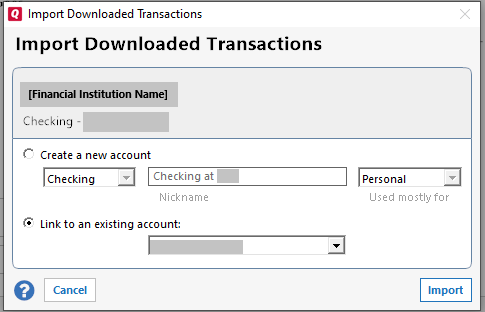
If needed, please refer to this support article for instructions on how to deactivate the account. Then, follow the steps below to import and link the .qfx file.
- Download and import the bank (.qfx) file as you normally would
- Click Link to an existing account, then choose the account nickname from the drop-down menu.
- Click Import
Now that you deactivated the account first, see if the import will work successfully or if you still receive the same error code.
If successful, you will then need to deactivate the account again, and then reactivate the account to set the original connection method you had back up. If needed, please refer to this support article for reactivation instructions.
I hope this helps!
-Quicken Anja
Make sure to sign up for the email digest to see a round up of your top posts.0 -
Hello again,
We haven't heard back from you in a while. Do you still need assistance?
Thank you!
-Quicken Anja
Make sure to sign up for the email digest to see a round up of your top posts.0 -
Hello again,
Due to the lack of response, I went ahead and closed this post.
If you still require assistance, please feel free to start a new post.
Thank you!
-Quicken Anja
Make sure to sign up for the email digest to see a round up of your top posts.0
Categories
- All Categories
- 56 Product Ideas
- 36 Announcements
- 224 Alerts, Online Banking & Known Product Issues
- 22 Product Alerts
- 702 Welcome to the Community!
- 671 Before you Buy
- 1.2K Product Ideas
- 53.7K Quicken Classic for Windows
- 16.3K Quicken Classic for Mac
- 1K Quicken Mobile
- 812 Quicken on the Web
- 111 Quicken LifeHub