Got an alert to reset all online accounts [Edited]
Having been in the software world for a long time something is not correct….got an alert to reset all my online accounts, etc. Other online errors in a normally ok file. Hope they are transparent in what seems to be going on here. Got a bunch of errors RE: trying to sync again today.
Comments
-
Hello @mdonlan,
Thank you for letting us know you're encountering this issue. To better assist, please provide more information. You said you received an alert to reset all online accounts. Was this an error message you encountering in your Quicken program? When did you see this alert (for instance, did it pop up when you tried to run One Step Update)? Did the alert also provide any error code? Is today the first time this has happened? If not, when did the issue start, and how often does it happen?
I look forward to your response!
Quicken Kristina
Make sure to sign up for the email digest to see a round up of your top posts.
0 -
C-800 error. Reactivated all the accounts and same thing happened again. There are quite a few other posts on the same issue. Also got a "Internal Communication Error" from a Quicken Dialogue Box when trying to sync to cloud after reactivating all the accounts.
0 -
Thank you for your reply,
You mentioned that you reactivated the accounts and the issue happened again. I can see that you were getting the error yesterday and that you reconnected accounts with multiple financial institutions today. When did this happen the first time? How frequently has this been occurring?
Thank you!
Quicken Kristina
Make sure to sign up for the email digest to see a round up of your top posts.
0 -
Since May 16th it happened twice. So had to reset every online account twice. Just did it again this am. So far no other other reset messages.
1 -
Thank you for your reply,
I can see that you deactivated and re-added/reconnected accounts with Charles Schwab, American Express, USAA, Bank of America, Novo, and Wells Fargo - Business. Are those all the affected financial institutions? If not, what other financial institutions did you see this issue happen with?
If you haven't already done so, I recommend navigating to Tools>Account List and checking for any accounts that are inactive or closed on the financial institution side, but still trying to connect in Quicken, since that can sometimes cause this issue.
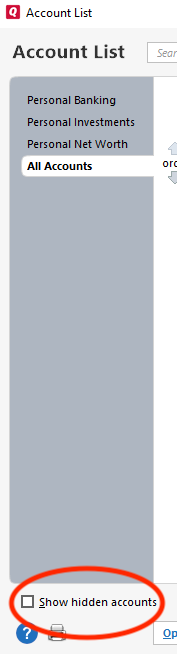
In the Account List window, please make sure to select Show hidden accounts, near the lower left corner of the window. Note - If you do not have any hidden accounts, this option will not be visible.
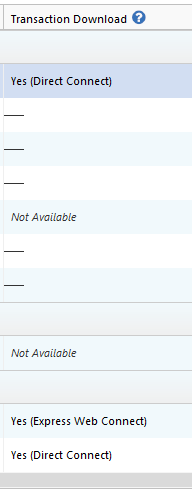
Once any hidden accounts you have are visible, check for any accounts that are still trying to connect in Quicken when they shouldn't be. You can tell if Quicken thinks an account is connected by looking in the Transaction Download column. If it shows the word "Yes" and a connection method, then Quicken thinks the account is connected.
If you see any accounts that Quicken thinks are connected, but shouldn't be, then please backup your Quicken file and deactivate those accounts.
Thank you!
Quicken Kristina
Make sure to sign up for the email digest to see a round up of your top posts.
0
Categories
- All Categories
- 56 Product Ideas
- 36 Announcements
- 225 Alerts, Online Banking & Known Product Issues
- 22 Product Alerts
- 703 Welcome to the Community!
- 671 Before you Buy
- 1.2K Product Ideas
- 53.7K Quicken Classic for Windows
- 16.3K Quicken Classic for Mac
- 1K Quicken Mobile
- 812 Quicken on the Web
- 111 Quicken LifeHub