how to add roboform to quicken's one step update to enter the vault password?
Ok, I had it working, but something happened when I turned off One Drive. After that, the Roboform started filling in the wrong P/W? I went to Roboform and changed it, but it still came up wrong (correct manually types P/W worked fine) and manually entering the correct P/W never prompted for it to be replaced or doing that in Roboform even.
So I deleted it, and I probably messed up where it said something like 'block Roboform', and in haste pressed OK.
So NOW I'd like it back!
I can't find specific instructions on how to do this?
On W11 and Quicken for Windows V R62.16
Comments
-
Quicken has no user setting that prevents Roboform from doing its job.
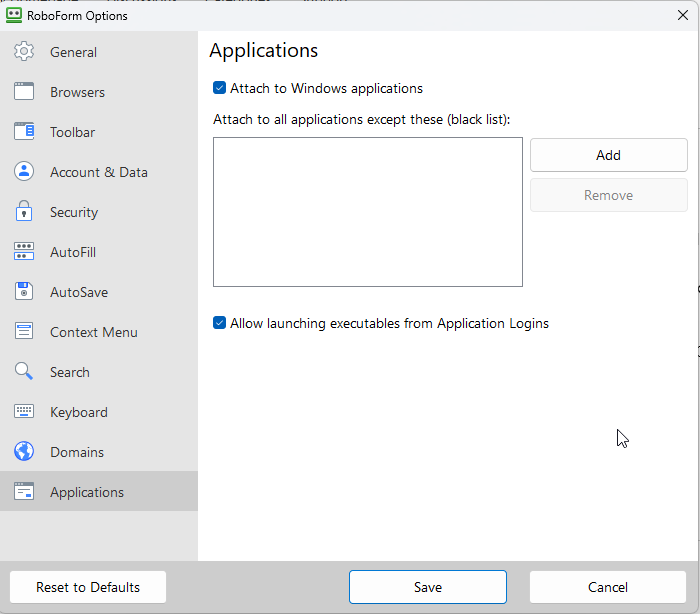
I use Roboform and it works great for me filling in the Password Vault password. Check in Roboform→Options for this section of Options to make sure that you have not black listed it.
BTW, as a long time RF user, I was not aware of this ability until you brought it up.
-splasher using Q continuously since 1996
- Subscription Quicken - Win11 and QW2013 - Win11
-Questions? Check out the Quicken Windows FAQ list0 -
Hmm, that is what I have, same thing, but it doesn't work?
I deleted it when it was working, however there was some 'hiccup' and I had to restore a backup of the settings. After that, the Roboform P/W saved did not work? I even changed it to the correct one, didn't work. Then I figured, OK, I'll manually enter the correct one, never got prompted to replace it? So I deleted it on the toolbar. I do recall seeing something about blocking? However, if it did that, it didn't show on the above screen? Confused?
0
Categories
- All Categories
- 56 Product Ideas
- 36 Announcements
- 225 Alerts, Online Banking & Known Product Issues
- 22 Product Alerts
- 703 Welcome to the Community!
- 671 Before you Buy
- 1.2K Product Ideas
- 53.7K Quicken Classic for Windows
- 16.3K Quicken Classic for Mac
- 1K Quicken Mobile
- 812 Quicken on the Web
- 111 Quicken LifeHub