Quicken did NOT add or link a bank account.

alexwill
alexwill Quicken Windows Subscription Member

I wanted to add two bank accounts at a common bank in Quicken.

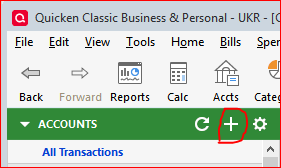
1. Quicken's instructions said, "Click the '+' sign at top of accounts list. BUT, there is no + sign anywhere to be seen.
2. I went to Tools menu, and clicked add account. Instead of adding an account, it went to the bank website. It noticed the two accounts there, but when the linking was "finished" Quicken still did not add the two new accounts.
3. So, I again went to tools - add account, but this time, I added two "offline" accounts. I completed that, and expected to set up the online link later. Then, I went to "Edit/Delete" account, and "Online Services", "Set up now". It went to the Add Account - Search for your financial institution" page and proceeded to repeat the steps listed in 'Point 2.' above.
4. In other words, another day, another problem.
5. Can you think of a way to get accounts to link? Thanks.

i have Quicken Classic Deluxe Ver 62.16 Bld: 27.1.62.16.

Tagged:

Answers

  • [Deleted User]
    edited June 2

    @alexwill I think in this case we would need to know what financial institution you are working with. It could be that for your financial institution, Web Connect (downloading from the financial institution's website) is the only connection option. If that is the case then that would explain the what is happening.

  • UKR
    UKR Quicken Windows Subscription SuperUser ✭✭✭✭✭

    I don't know where you found these instructions, but Step 1 should read:

    "Click the '+' sign at top of Accounts Sidebar"

    image.png

    Of course, Tools / Add Account performs the same function.

    As far as the new accounts are concerned … how new are they? Have you deposited some money into these accounts yet ("funded the accounts")?
    Some banks require that you enable accounts for downloading from the bank's website before you can connect them to Quicken. This is on top of / in addition to the process of authorizing access to your accounts by Quicken / Intuit.

    Before you try Add Account again, be sure to first deactivate all accounts currently activated for downloading (from this bank). Then, when run Add Account and you get to the view showing the list of accounts found at the bank, capture a screen image snapshot, to aid in troubleshooting, before you review the results and ensure that all accounts, old and new are now correctly being linked to the Quicken account registers.

  • @UKR I don't have the"+" either. It depends on if you show Tabs or not.

    image.png
This discussion has been closed.