Venmo 2FA challenge every OSU after experiencing CC-800 issues
I'm one of the many folks who has been experiencing the CC-800 issues.
After following a support tech's advice to "copy" my data file and then re-authenticate all of my accounts, I am now being presented with a 2FA authentication prompt (SMS to my mobile phone) for my Venmo account every time I do an OSU.
How can this be fixed? This wasn't a problem until I followed the steps that I was given by Quicken Support.
Comments
-
Hello @Dave1234,
Thanks for bringing this issue to our attention.
I am wondering if, since you copied your data file and had to reconnect/reauthenticate your Venmo account(s), perhaps this process disconnected/confused Venmo's multi-factor servers. First, I would navigate to your Venmo account page on their direct website and look for any setting/preference regarding 2-factor or multifactor authentication for third-party applications.
Let me know what you find!
-Quicken Jasmine
Make sure to sign up for the email digest to see a round-up of your top posts.
0 -
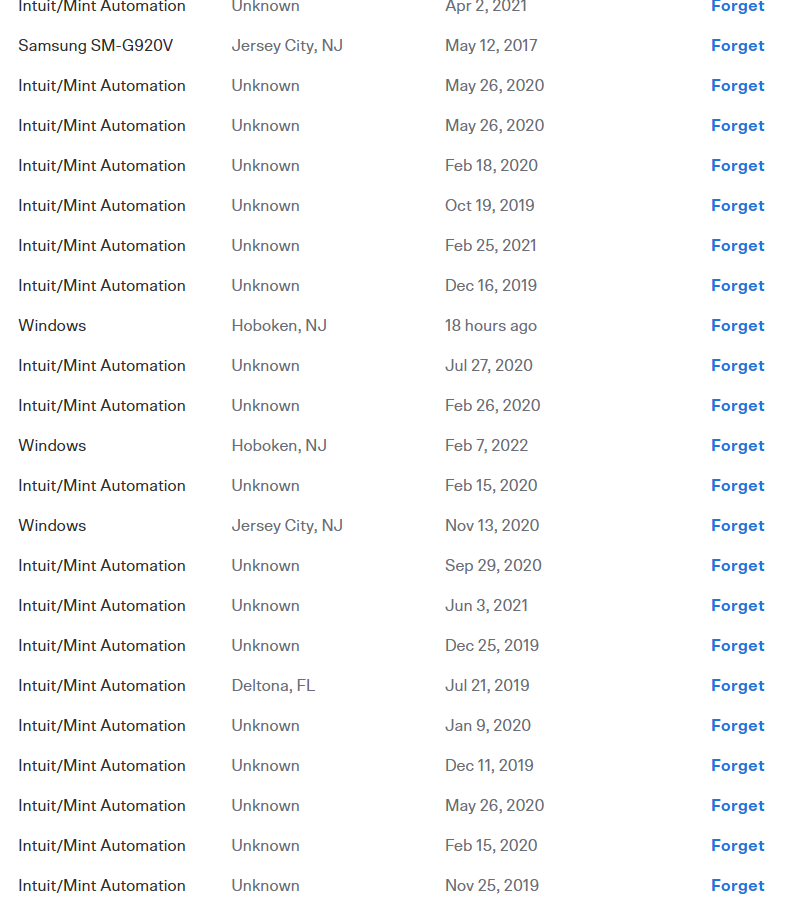
I logged in to the Venmo website and there's a "security" section that shows everything that has been authorized and no longer needs 2FA. This is part of that long list (note all of the Intuits…)
I deleted all of the garbage in this list - all of the old Intuit connections and the other un-needed connections (old phone, old web browser, etc).
I then reset the EWC connection in Quicken, and got two 2FA challenges, which I completed.
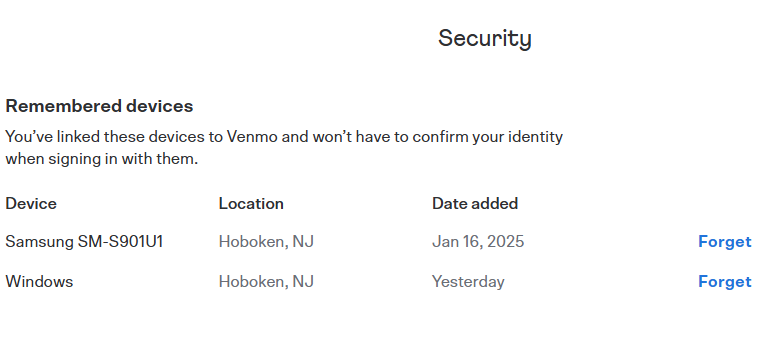
When done, Intuit still does not appear in this list, and I'm still getting 2FA challenges. The only things that appear in the list are my mobile phone (where I use the app), and the web browser from where I got the screenshot:
Seems to me that Quicken isn't doing the 2FA authentication correctly with Venmo to ensure that the connection is remembered.
0 -
Thanks for coming back and providing more information.
Upon further investigation, the multifactor authentication code that you receive each time you perform a One Step Update does come directly from Venmo; they are requiring it. From what I understand, you may be able to completely turn off 2-factor authentication on Venmo's direct website, which will hopefully push it to not be required in Quicken when updating your accounts. However, this is not an issue that Quicken can fix or assist with, as these requirements are security measures put in place by the financial institutions themselves, and they operate via the financial institution's servers, which Quicken does not have access to.
I apologize that we could not be of more assistance!
-Quicken Jasmine
Make sure to sign up for the email digest to see a round-up of your top posts.
0 -
I don't think this is true. As you can see from my screenshots, Venmo used to "trust" Intuit, and it currently "trusts" both my mobile device and my web browser. Why can't Venmo "trust" Quicken, too? Isn't this just the proper setting of a cookie? "Remember this device" is a setting on every bank's web page (including Venmo) - it's the same thing.
0 -
There are at least two other threads in these forums from people expressing exactly the same problem with Quicken and Venmo.
0
Categories
- All Categories
- 56 Product Ideas
- 36 Announcements
- 225 Alerts, Online Banking & Known Product Issues
- 22 Product Alerts
- 703 Welcome to the Community!
- 671 Before you Buy
- 1.2K Product Ideas
- 53.7K Quicken Classic for Windows
- 16.3K Quicken Classic for Mac
- 1K Quicken Mobile
- 812 Quicken on the Web
- 111 Quicken LifeHub