Wells Fargo one step update not working
Comments
-
It worked! Thank you so much. I am really happy to have a fully functional Quicken!
0 -
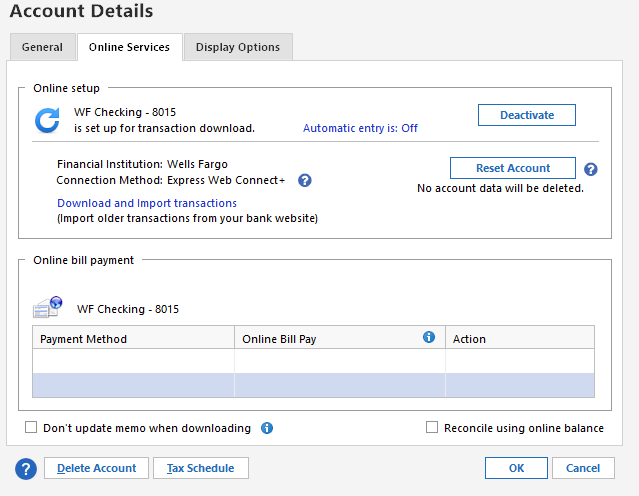
I just solved this issue. Open Account Details. It was showing online bill pay was yes, I DON'T. I deactivated then I also checked the connection method and saw that it was set to Direct Connect I clicked the change option and selected Express Web Connect saved the changes and updated the accounts and they finally download all my current transactions. HOPE THIS HELPS
 0
0 -
@Terryhtx - it all depends on what features you use in Quicken. Express Web Connect+ is fine, but it has limitations. Wells Fargo investment accounts using EWC+ can only be set up with Simple Tracking. It also doesn't allow the user to use bank bill pay within Quicken. I think just the fact that you disconnected and then reactivated your connection corrected your issue. It probably still would have worked if you reconnected with Direct Connect.
0 -
@Terryhtx - I tried your fix, and I still have the same issue. Quicken takes me to my WF login, I log on to my WF account to finalize the setup, Wells Fargo says I'm good and will re-direct me to Quicken. That doesn't happen, so I close the Browser and go back into Quicken. Quicken times out waiting for the information from WF and says I need to logon to my bank. An endless Loop. New transactions are still not downloading.
@CaliQkn - I have tried your fix, and it still doesn't work for me. I guess the next step is to contact WF or Quicken Support???
0 -
@deacon it seems like from your description that you are trying to connect with EWC+. Have you tried connecting with Direct Connect? The last paragraph in my prior comment describes how to connect with DC.
0 -
Contacted Quicken support. They had me run a "Validate & Repair" that appears to have fixed my issue.
Thanks to all!
0 -
@deacon glad you got it fixed. Sometimes the best solutions are the easiest. I always need to remind myself that a data file validate should be the first troubleshooting step to try.
0 -
Thank you! This worked for me!
0 -
@lewisofarabia
thank you for that information. To connect Wells Fargo accounts withEWC+This worked for me! Thanks so much!!
0 -
I have been having this problem with Wells Fargo for quite some time. I get the same sequence of errors shown above. I have worked with both their customer service and their technical support and am told it is because my cell phone is "not eligible" for 2FA.
My cell phone is through Mint Mobile, and therefore it must be Mint's problem. I find this answer unacceptable 1) Mint reports 2-4 million users and I find it hard to believe that many are excluded from being customers of Wells Fargo, and 2) I have enrolled this phone number with over 50 other websites (including Wells Fargo's online banking) and all are able to text to my number just fine.
This is something specific to Wells Fargo and One Step Update.
0 -
@Dave Kacoroski is it the FMSSETUP verification that you aren't able to complete with your cell phone? If so, you can also use your e-mail for verification.
0 -
Yes, it is the FMSSETUP that reaches the dead end. In attempting to activate One Step Update with my Wells Fargo credit cards I have never been given an option to use email.
0 -
@Dave Kacoroski do you have the option of a "Push Notification"? If so, have you tried that?
0