Can't Download a UBS Financial Services Investment Account

MLB56
MLB56 Quicken Windows Subscription Member, Windows Beta Beta

For the past several months, I've been trying to add a UBS Financial Services Investment account to my Quicken Classic account. In Quicken, I go through the steps to add a new account. When I get to the Quicken screen for entering the UBS Online Services User Name and Password I enter my UBS credentials. I know those credentials work as I can go directly to the UBS Online Services website and gain access. However, when I use those credentials through Quicken, I receive the attached error message stating the credentials don't match UBS' records. I recall seeing this same issue several months, but the issue was closed. Why, I don't know as the issue is still open. I've contacted UBS and they contend this is a Quicken issue. Any help to resolve this ongoing matter will be appreciated.
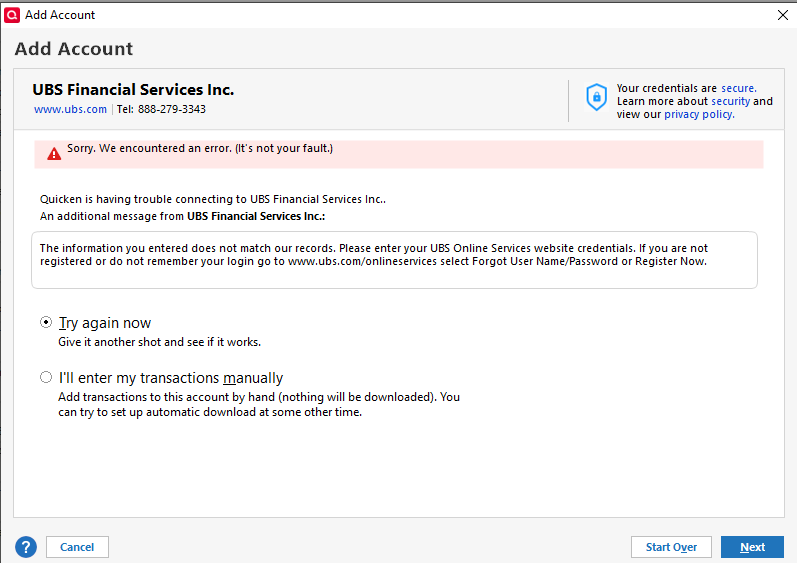
2025-06-22.png
Tagged:

Best Answers

  • Boatnmaniac
    Boatnmaniac Quicken Windows Subscription SuperUser, Windows Beta ✭✭✭✭✭
    edited June 22 Answer ✓

    Is the account you are trying to get connected with an employer's 401K plan?

    If so, you will likely need to contact the Plan Administrator (or maybe the plan's contact at UBS) to obtain login instructions. They are often unique and different from the website login. I know it was for me when my Dell 401K plan was with UBS.

    You might also want to check the UBS website and search for a help article that might exist (it might not) for downloading into Quicken.

    NOTE: Not all employer 401K plans support Quicken even if UBS in general does. The employer's contract with UBS needs to require/authorize support for Quicken before UBS will add such support.

    Quicken Classic Premier (US) Subscription: R65.15 on Windows 11 Home

  • [Deleted User]
    Answer ✓

    @MLB56 have you tried logging onto the website that is noted in the message from UBS? Maybe you need to register before you can establish a connection?

  • ATC Doug
    ATC Doug Quicken Windows Subscription Member ✭✭✭
    Answer ✓

    @MLB56 I had the same problem with another financial institution. You might be locked out with your current password and ID because of to may tries. I also was able to log in through providers website but not through Quicken. I contacted the provider and they reset everything on their end. I was able to go through Quicken.

Answers

  • Boatnmaniac
    Boatnmaniac Quicken Windows Subscription SuperUser, Windows Beta ✭✭✭✭✭
    edited June 22 Answer ✓

    Is the account you are trying to get connected with an employer's 401K plan?

    If so, you will likely need to contact the Plan Administrator (or maybe the plan's contact at UBS) to obtain login instructions. They are often unique and different from the website login. I know it was for me when my Dell 401K plan was with UBS.

    You might also want to check the UBS website and search for a help article that might exist (it might not) for downloading into Quicken.

    NOTE: Not all employer 401K plans support Quicken even if UBS in general does. The employer's contract with UBS needs to require/authorize support for Quicken before UBS will add such support.

    Quicken Classic Premier (US) Subscription: R65.15 on Windows 11 Home

  • [Deleted User]
    Answer ✓

    @MLB56 have you tried logging onto the website that is noted in the message from UBS? Maybe you need to register before you can establish a connection?

  • ATC Doug
    ATC Doug Quicken Windows Subscription Member ✭✭✭
    Answer ✓

    @MLB56 I had the same problem with another financial institution. You might be locked out with your current password and ID because of to may tries. I also was able to log in through providers website but not through Quicken. I contacted the provider and they reset everything on their end. I was able to go through Quicken.

  • MLB56
    MLB56 Quicken Windows Subscription Member, Windows Beta Beta

    Thank you all for your comments. Here are my specific responses to the following:

    Boatnmaniac: The account I'm trying to add to Quicken isn't a 401k plan. The strange thing is I have other UBS accounts previously added to Quicken which function perfectly.

    CaliQkn: I'm able to directly access the UBS site with the credentials I'm using with Quicken and have no issues downloading transactions.

    ATC Doug: I previously was locked out of the UBS website because of too many failed log-in attempts. I simply had to reset the password. I'll try to contact UBS to see if they can reset things on their end.

This discussion has been closed.
