Downloaded transactions don't match automatically or manually

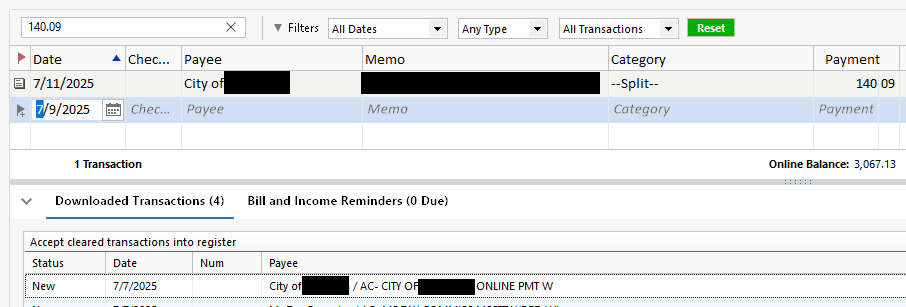
See pic below.
This downloaded transaction did not match automatically even after I changed the date on the register transaction to match the downloaded transaction date.
Additionally, when I attempted to manually match, the register transaction doesn't appear in the list of transactions to select for matching.
Quicken user since 1991
VP, Ops & Tech in the biometric space
Comments
-
Sometimes the logic that Quicken uses to match a downloaded transaction to either an existing register transaction or the next instance of a scheduled reminder (not yet recorded as a register transaction) escapes me.
The downloaded transaction arrived 4 days early and the reminder has not yet been recorded into a register transaction. That appears to be outside the acceptable range of days into the future that Quicken will use to match a transaction.
AFAIK, recording the reminder into the register with a date of 7/7 should change the downloaded transaction's status to Match so you can accept it.
If, for example, you paid early on the City's website, it would have been better to immediately record the reminder with the actual payment date. This would have made it possible for Quicken to set Match status for the downloaded transaction upon arrival.
0
