Vystar popup reporting outage yesterday and today even though OSU reports successful

leishirsute
leishirsute Quicken Windows Subscription Member ✭✭✭✭

Getting this popup in Quicken when trying to download transactions from Vystar. This also happened yesterday. It seems like a new way that Vystar is reporting Quicken connection outages which makes it look like the download completed successfully in the One Step Update Complete section of the pop-up.
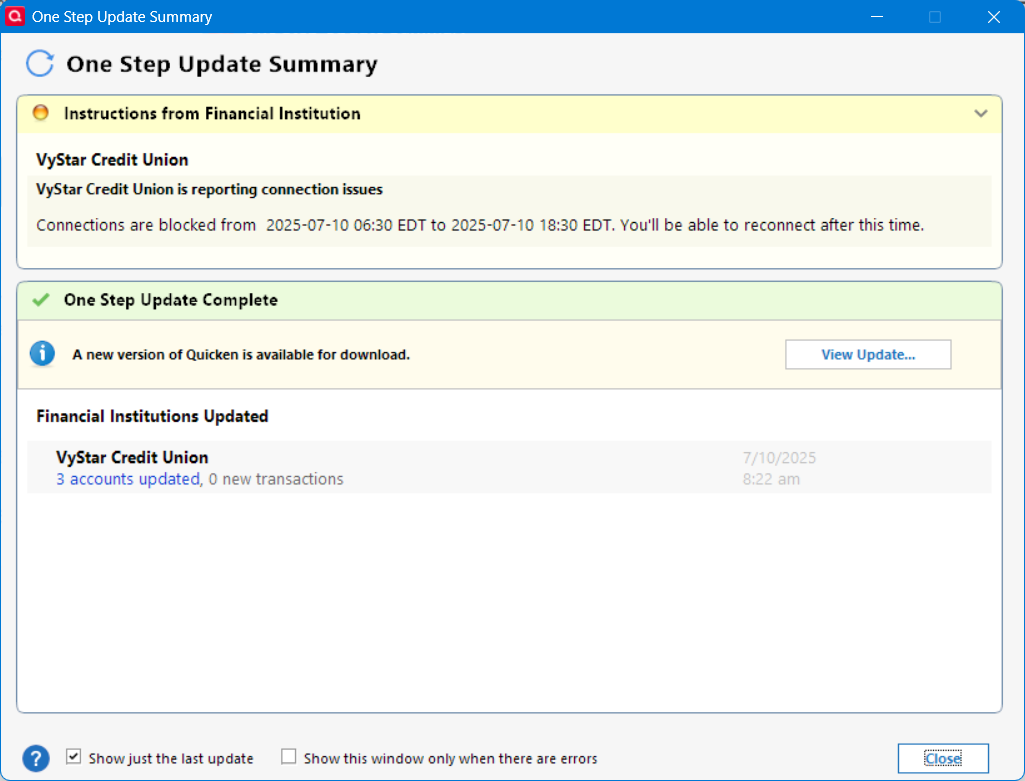
image.png

Is this a bit confusing?

Is anyone else experiencing this issue?

Deluxe R64.30, Windows 11 Pro

Answers

  • Quicken Anja
    Quicken Anja Moderator mod

    Hello @leishirsute,

    We appreciate you bringing this issue to our attention!

    Our teams are actively investigating this issue further as we have seen this error occur across multiple different financial institutions, and they would like users experiencing this error to try the steps provided below:

    1. Run One Step Update (OSU) first to see if the issue resolves.
    2. If the issue persists, rename the runtime.dat file located at: C:\ProgramData\Quicken\Inet\FILENAME\
      • (For example, add a 1 at the beginning of the file name so it reads 1runtime.dat.) image.png
    3. Run One Step Update again to check if the problem is resolved.
    4. Close and reboot Quicken to ensure changes take effect.

    📌 Note: The ProgramData folder is hidden by default. If you need help accessing it, Microsoft's support site has instructions on how to unhide folders.

    To assist in our investigation, please provide the following and let us know once you have done so:

    • Logs (Help > Report a Problem)
    • Screenshots (excluding personal data)
    • A sanitized copy of your Quicken data file (with personal details removed)

    Thank you!
    (CTP-12393)

    -Quicken Anja
    Make sure to sign up for the email digest to see a round up of your top posts.

  • leishirsute
    leishirsute Quicken Windows Subscription Member ✭✭✭✭
    edited July 10

    Okay, here's some feedback.

    I renamed runtime.dat, restarted Quicken and run an update for the Vystar account only and that got rid of the Instructions from Financial Institution message.

    So then I ran OSU for all accounts, and there was no Instructions from Financial Institution message, however all Express Web Connect accounts (including Vystar) showed no update time stamps on the One Step Update Complete section.

    So I disconnected the Quicken account by preferring a different user account, and reconnected with my account credentials and reran OSU for all accounts. All accounts displayed an update date/time stamp in the One Step Update Complete summary but the Vystar Instructions from Financial Institution returned.

    "

    I will submit a ticket.

    Deluxe R64.30, Windows 11 Pro

  • Quicken Anja
    Quicken Anja Moderator mod

    Yes, exactly—please navigate to Help > Report a Problem in Quicken, and include all of the following:

    • A brief summary of the issue
    • Your log files
    • Screenshots (if available)
    • A sanitized copy of your data file

    In the title or subject field, please include: Attn: CTP-12393

    Thanks again for taking the time to troubleshoot and document everything so thoroughly—we really appreciate it!

    -Quicken Anja
    Make sure to sign up for the email digest to see a round up of your top posts.

  • leishirsute
    leishirsute Quicken Windows Subscription Member ✭✭✭✭

    Oops I already submitted it prior to getting your message about

    Attn: CTP-12393

    I can resubmit.

    Deluxe R64.30, Windows 11 Pro

  • Quicken Anja
    Quicken Anja Moderator mod
    edited July 10

    That's okay, I can pull your submission and get your details, and files attached to the ticket.

    Thank you!

    -Quicken Anja
    Make sure to sign up for the email digest to see a round up of your top posts.

  • leishirsute
    leishirsute Quicken Windows Subscription Member ✭✭✭✭
    edited July 10

    Question: Are transactions actually downloading from Vystar even though the Instructions from Financial Institution says they are blocked.

    By the way, it appears that Quicken eventually corrected the missing time stamps and got rid of the Instructions from Financial Institution section after reconnecting the Quicken user account. It appears that it took a few minutes for Quicken to sync with the cloud. But now the OSU Summary is displayed without issues as it did before the Instructions from Financial Institution section appeared. So renaming runtime.dat appeared to have resolved that section in the OSU summary, and reconnecting the Quicken account and waiting a few minutes for cloud sync resolved the date/time stamp issue that renaming runtime.dat created.

    Deluxe R64.30, Windows 11 Pro

  • leishirsute
    leishirsute Quicken Windows Subscription Member ✭✭✭✭

    @Quicken_Anja I messaged you my info. Please let me know if you need more info.

    Deluxe R64.30, Windows 11 Pro

  • Quicken Anja
    Quicken Anja Moderator mod

    -Quicken Anja
    Make sure to sign up for the email digest to see a round up of your top posts.

  • Quicken Anja
    Quicken Anja Moderator mod

    I apologize, didn't mean to skip over this. I must've missed seeing this message earlier, but thanks for the update—glad to hear the issue seems to be resolved on your end after the steps you took!

    To answer your question: I can’t say for certain whether transactions were downloading despite the “Instructions from Financial Institution” message, but based on previous reports from other users who encountered the same message, they did still receive their downloads as expected. So it does appear that downloads can still occur even when that message is present.

    I’ve also gone ahead and added your logs and details to the internal ticket regardless—it’s still helpful for the investigation and may assist the team in narrowing things down. Appreciate you following up!

    -Quicken Anja
    Make sure to sign up for the email digest to see a round up of your top posts.

This discussion has been closed.
