Looks like Automatic backup is skipped when switching Quicken files?
Using Windows, Classic Business and Personal R63.21. I've noticed this issue through many revisions.
I have two Quicken data files…I manage my own and a different file for a living trust.
I love the automatic backups and have it set to backup frequently:
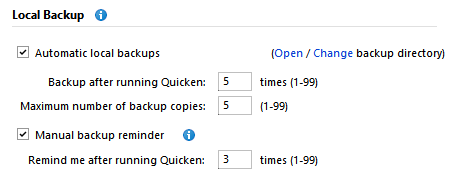
I believe the backup is only checked on exit…which would normally make sense. BUT…since I tend to work on both files in the same session the automation is spotty.
Work flow:
Open quicken. Whichever file I closed last time comes up.
Do my work in that file
Switch to the other file via the file menu
do my work in the other file
then exit.
It would be great if switching files were treated the same as exiting. Exit, then enter and switch, then exit again seems excessive.
Do I have this right? Or am I hallucinating?
Comments
-
I believe you are right. I have seen the same behavior.
In the same context, the manual backup prompt does not appear when switching open files, either.
I am a little mixed on the right behavior. There are times I’d appreciate the auto or prompt to backup. In other cases, it would be an interruption. So I come to a position that the user should be aware this situation and manually make the backup if needed.
0 -
Try setting your Backup after running Quicken and Remind me after running Quicken counts to 1 and see if that triggers backup a little more frequently.
I'd also increase the maximum number of backup copies to greater than 5.
You can never have enough backup copies, provided you have sufficient disk space.I concur with you that switching to a different file should be treated the same as Exit Quicken and Auto-Backup, no matter how often you switch files in a day.
0 -
This has is a long-standing problem. I think that the main reason it hasn't been addressed is there isn't that many people switching data files, or at least not a lot of them that are using Quicken's backups and are willing to come here and complain. I have seen the complaint over the years, but very infrequently. And no, no setting in Quicken will make it do it right. Or like @q_lurker said, maybe Quicken Inc doesn't even consider it a problem.
Signature:
This is my website (ImportQIF is free to use):1
Categories
- All Categories
- 56 Product Ideas
- 36 Announcements
- 223 Alerts, Online Banking & Known Product Issues
- 22 Product Alerts
- 701 Welcome to the Community!
- 671 Before you Buy
- 1.2K Product Ideas
- 53.7K Quicken Classic for Windows
- 16.3K Quicken Classic for Mac
- 1K Quicken Mobile
- 813 Quicken on the Web
- 111 Quicken LifeHub


