crashes/closes using validate, archive
If Quicken unexpectedly crashes while running a Validate, I suspect that your active Quicken data file has been damaged beyond the capabilities of Validate to repair it. Restore a backup data file to a different file name (do NOT overwrite the active data file. You may still need it). Validate and Supervalidate the restored file. If Quicken still crashes, restore successively older backup files until you find one that doesn't crash. Proceed with bringing this file up to date and use it as your new active data file.
tried to restore backup files, per your procedure noted above, going back to 2011,,,,,they all crashed…
Hello @markkline,
Thank you for letting us know that you're seeing the same behavior, even with older backups. To help troubleshoot, please provide a bit more information. Does the crashing happen only when trying to archive transactions or validate your file? If not, then what other behaviors seem to trigger the crashes?
I can see that you contacted Support on the 17th (ticket# 11519797). Were they able to help you with the issue? It looks like they had you create a test file while troubleshooting. Did you encounter the same issue with crashing in that test file?
I look forward to your response!
crashes are happening with:
archiving
super validating/validating/repair
backup/restore
i have not directly contacted support…just this dialogue on the community…not sure where you got the ticket ##
Thank you for your reply,
Sorry for the confusion; that ticket is from the 17th of January, when you had a very similar problem and contacted Support. The resolution from that time was restoring a backup from earlier in January. Based on your earlier response, restoring an older backup was not a viable solution this time.
Based on your description of the issue, as @UKR stated earlier, this issue is most likely due to a problem with the data file itself. Since you were unable to find a backup file that does not crash, the next step is to try making a copy of your file and doing a validate on the copy. To create a copy, please navigate to
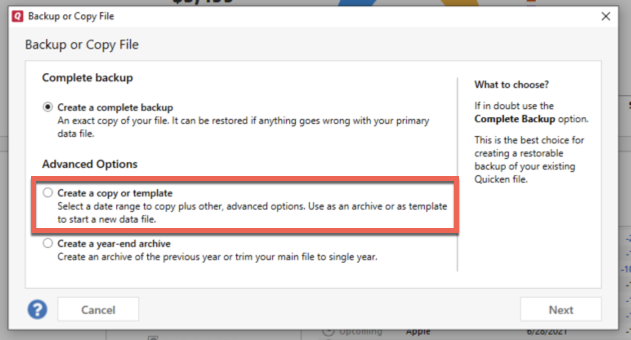
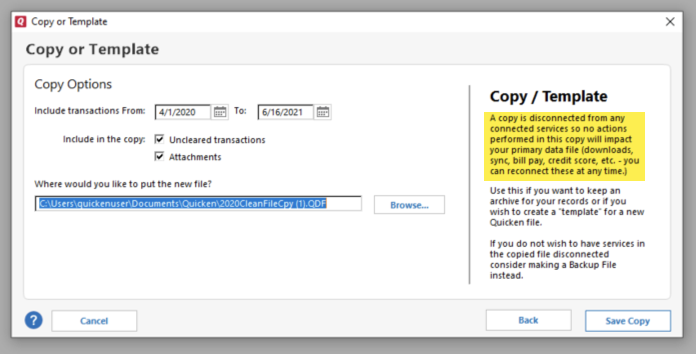
File > Copy or Backup File... > Create a copy or template (see examples below) which will also allow you to select a date range to move forward with.
If you wish to move forward with your entire data file, please check the full date range of your entire data file before copying so you can enter the correct date range if you do not wish to "shrink" your file by eliminating certain dates. Note - The only reason you would want to "shrink" your file is if you suspect the problem is being caused by older data, and you want to exclude that older data from the copy.
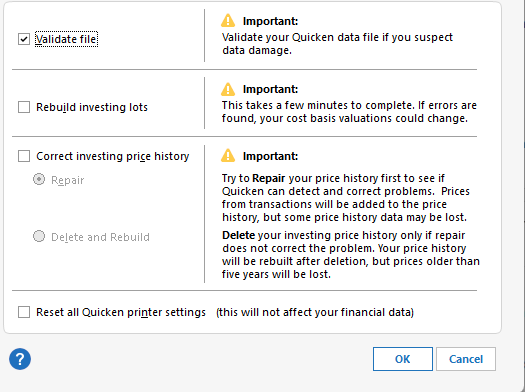
Once you have created the copied file, please navigate to File>Validate and Repair File…. Select the Validate file checkbox, then click OK and wait for the validate to complete.
If it successfully completes the validate, then please test the other functions that trigger the crashes to verify if the issue is resolved.
If the issue is not resolved, then return to your main file (for instructions on switching between files, click here).
If the issue is resolved in the copied file, then I recommend you use that file as your new main file. It's important to know that all online services are disconnected in the copied file, and you will need to sign back in with your Quicken ID and reconnect all of your online accounts, online billers, Quicken Bill Manager services, etc if you plan to use that copied file going forward. The reason for this is that the new copy also creates a new and separate dataset ID.
Please let me know how it goes!
crashed every time, tried 18 months, then 12 months, then progressively smaller increments down to 6/1/2025-present
hard to believe all of my backup files, especially the majority that haven't been touched in years, are corrupt.
Is it a possibility that the programming for these features is causing corruption as they are utilized with my files? Searching for a common denominator…..
To troubleshoot for program issues, please start by manually reinstalling the latest update patch. To do that, follow the directions in this article:
If the issue persists after you've manually reinstalled the patch, try uninstalling the program, then reinstalling it. After the reinstall, restart your computer and test to see if the issue persists.
I hope this helps!
went through the steps you've outlined….problems persist……
Since a regular uninstall/reinstall did not correct the issue, try following these steps:
same problems as noted persist…..
Since the patch update and uninstall/reinstall did not correct the issue, the crashing issue is unlikely to be a problem with the Quicken program itself. It is more likely to be file-specific, or possibly an interaction between programs.
To continue troubleshooting file issues, the next step (per our help article on data file issues) is to export your Quicken data, create a new Quicken file, then import your data into that new file.
Thank you!
I have not seen any recent response. Do you still need help?