storing backups [Edited]
Please don't tell me the cloud. Where on my laptop can I save back ups ? If I move them to a folder, I seem to lose my most current file within Quicken. Twice now, I have had to re-download a month's worth of transactions after saving the backups to a folder. They are now all over my desktop, and I cant find things. Please help (computer stupid here)
[Edited - Readability]
Best Answer
-
got it thanks again
0
Answers
-
Hi @bitehard ,
You don't move files, you create a backup file. Buy a usb hard drive and plug the hard drive, into a folder on the external hard drive. Once you do that, you can cleanup the desktop.
thecreator-bTesting Quicken Subscription Beta B63.19 (Nov. 2023) Installed 24/7.
in Windows 10 Pro 64-Bit Build 19045.3693 Quicken Classic Business & Personal0 -
Yes, I create a backup file. I know that. Nothing on my laptop I can move them into then?
[Edited - Readability]
0 -
@bitehard do you have automatic or manual backups set up?
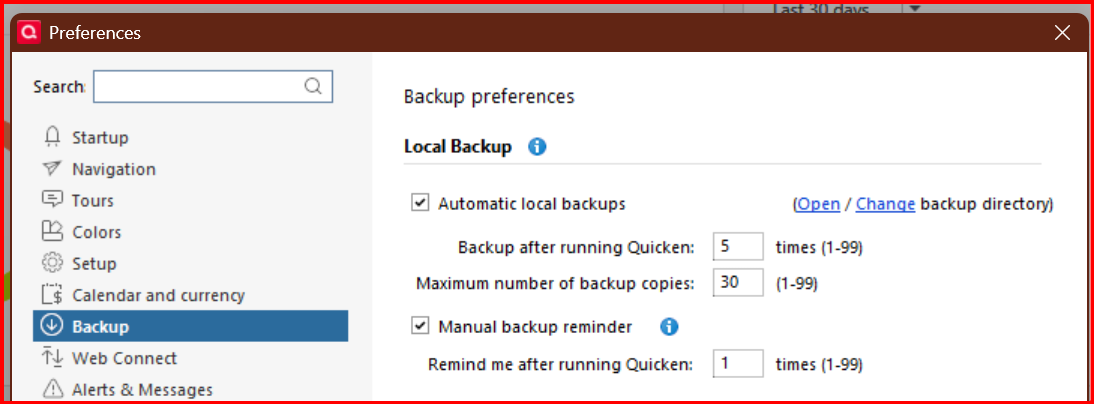
If you have automatic backups enabled, they will be saved to a default backup folder on your computer (C Drive) - Documents\Quicken\BACKUP. You can enable automatic backups and/or change the default location by clicking Edit → Preferences → Backup - Open/Change backup directory
If you do a manual backup, they can be saved anywhere, but sometimes they will default to your desktop. That is probably why you are seeing them there.
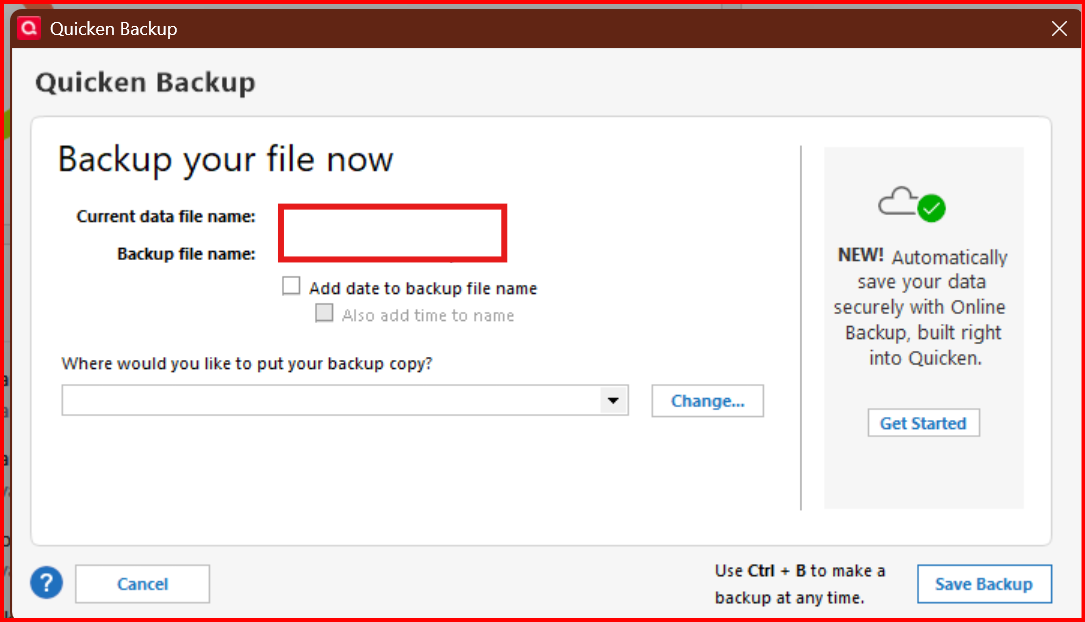
You can change the default folder for manual backups by clicking "Ctrl-B" and specifying the backup location -
Once you designate a manual backup location, it will default to saving to that location until you change it.
0 -
ph okay great it asks me every time if i want to back up. so i will take your advice (screenshot it! ) thanks!!!!
0 -
Backups made to the same Physical Hard Drive, are not true Backups.
"A backup involves creating a backup of your data or system and storing it on a separate device or in a separate location."
However, if your Hard Drive should fail, you lost everything. Or it becomes extremely expensive to pay someone to recover your data.
thecreator-bTesting Quicken Subscription Beta B63.19 (Nov. 2023) Installed 24/7.
in Windows 10 Pro 64-Bit Build 19045.3693 Quicken Classic Business & Personal0 -
not to sound anymore stupid then i already do, if i choose to change the location i type in (c drive) documents\quicken\backup or just choose auto backups?
0 -
@thecreator-b automatic backups default to a folder on the same physical hard drive. As I mentioned the backup location for either manual or automatic backups can be changed. But I do agree that a true backup shouldn't be located on the same drive as your system operating files.
0 -
@bitehard the manual and automatic backups are independent of each other. You can enable or change the location of your backup folder separately. You would first choose to use either manual or automatic backups and then change the location of the backup folder by the process in my first comment.
0 -
got it thanks again
0 -
@bitehard you are welcome, but please circle back if you have other questions, or run into issues. Having good backups in a safe location is important and can be a lifesaver. As @thecreator-b mentioned, it is a good idea to create your backup folder in a location other than your C: drive, just in case your computer or hard drive becomes inoperable.
0
Categories
- All Categories
- 56 Product Ideas
- 36 Announcements
- 223 Alerts, Online Banking & Known Product Issues
- 22 Product Alerts
- 701 Welcome to the Community!
- 671 Before you Buy
- 1.2K Product Ideas
- 53.7K Quicken Classic for Windows
- 16.3K Quicken Classic for Mac
- 1K Quicken Mobile
- 813 Quicken on the Web
- 111 Quicken LifeHub