Merrill Lynch Investments Connection Method Change to Express Web Connect
today I was prompted to change Merrill Lynch accounts from Direct Connect to Express Web Connect. I completed the reactivation process successfully. The Online Services Tab in the Account Menu shows Express Web Connect as the connection method.
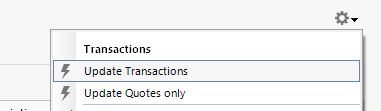
There is an issue when attempting a subsequent update of these reconnected Merrill Lynch accounts. The "Update Transactions" selection in the gear wheel menu in the top right of the transaction register DOES NOTHING
The usual pop up to confirm a selected update does not appear. An update process does not initiate..
The reconnected Merrill Lynch accounts do show in the account list in the One Step Update Settings.
Comments
-
I am using Quicken Classic Business & Personal Version 863.21 Build 27.1.63.21 on Windows 11. An update using One Step Update downloaded transactions from Merrill Accounts this morning, while the gear wheel menu selection "Update Transactions" selection noted above is inoperative.
[Edited - Readability]
0 -
Ditto what will66pu posted. I called Quicken Support and they know about the issue. I was told to wait ‘til Monday and try again. Not a very satisfactory answer.
[Edited - Readability]
0 -
Thank you for letting us know you're seeing this issue. To clarify, the problem you are encountering is that the Update Transactions option in the account does nothing, but you're able to update via One Step Update?
If that is what is happening, is the problem happening only in Merrill Lynch accounts? If so, does it affect all Merrill Lynch accounts or only some?
If that is not what is happening, please provide more details so I can help troubleshoot the issue.
I look forward to your response!
Quicken Kristina
Make sure to sign up for the email digest to see a round up of your top posts.
0 -
Kristina, your question one, the Upstate Transactions options does nothing, but am able to update Merrill accounts with One Step Update.
Your question two, this problem occurs only with the Merrill Accounts since changing connection method to Express Web Connect.
Your question three, it affects all Merrill accounts
0 -
OOps. I am different. My Merrill accounts do not update either way.
0 -
Thank you for your replies,
@EJZ,
What kind of accounts are impacted by this? We do have an open alert for missing transactions with Merrill Lynch:
The issue you describe sounds like it may be a file specific problem. To start troubleshooting, I suggest that you try validating your data file. Please save a backup file prior to performing these steps.
Validate:
- File
- Validate and Repair File...
- Validate File
- Click OK
- Close the Data Log
- Close Quicken (leave it closed for at least 5 secs)
- Reopen Quicken and see if the issue persists.
Please let me know how it goes!
Quicken Kristina
Make sure to sign up for the email digest to see a round up of your top posts.
0 -
I had already done a validation of the Quicken file. There were no file errors identified by the validation process.
0 -
Thank you for your reply,
The next troubleshooting step is to try restoring a backup from before the issue started.
Thank you!
Quicken Kristina
Make sure to sign up for the email digest to see a round up of your top posts.
0 -
Kristina, I think it is not advisable to try and see if restoring a backup file will help.
The Merrill transaction register cogwheel update issue I described earlier in this dialog started when I otherwise successfully connected my Merrill Lynch accounts via Express Web Connect. I should consider myself lucky. Unlike many others reporting problems with establishing any Merrill EWC connection at least the One Step Update of these accounts appears to be working for me. It is only the Update Transactions selection in the transaction register cogwheel menu that will not initiate an update for me.. This problem appears only with Merrill accounts when trying to update them from their transaction register..
If I were to restore a backup file, as you suggest, to an earlier file where the Merrill connection would still be a direct connection, that step would force me to start over attempting Merrill account conversion to EWC, as well as force me to reset/ reconnect of all other accounts —- (they would not sync to the Quicken cloud without a reset) , I would face possibly all the pain many other Quicken users are experiencing in failing to make any EWC connection to their Merrill Lynch accounts. Even if I were to succeed in connecting the backup file to Merrill through EWC, I have no reason to think all that effort would fix the cogwheel menu problem.
I sincerely hope Quicken develops a more workable solution then throwing a restore backup file suggestion at the wall and seeing if it sticks.
I assume for the moment you all are distracted by apparently bigger issues/bugs in the Merrill EWC transition than the cogwheel update issue, but I ask it not be ignored..
0 -
Thank you for your reply,
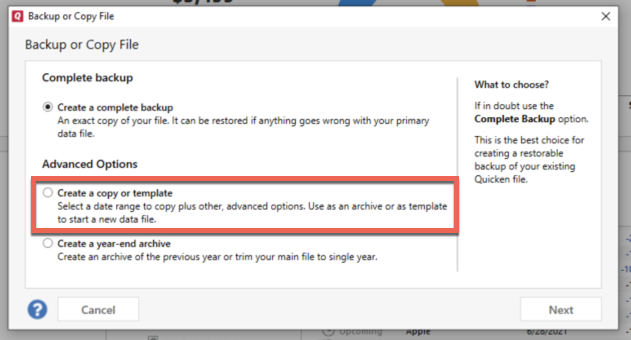
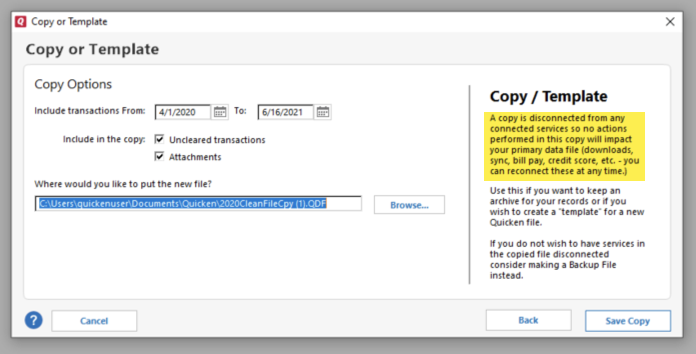
If restoring a backup isn't a viable option for you, then try creating a copy of your data file. This will rebuild all of the internal lists and database tables. To create a copy, please navigate to File > Copy or Backup File... > Create a copy or template (see examples below) which will also allow you to select a date range to move forward with.
If you wish to move forward with your entire data file, please check the full date range of your entire data file before copying so you can enter the correct date range if you do not wish to "shrink" your file by eliminating certain dates. Note - You should not need to "shrink" your file unless you believe the problem is being caused by older data in the file.
It's important to know that all online services will be disconnected in the copied file, and you will need to sign back in with your Quicken ID and reconnect all of your online accounts, online billers, Quicken Bill Manager services, etc if you plan to use that copied file going forward. The reason for this is that the new copy also creates a new and separate dataset ID.
Please reconnect only what is necessary to verify if the problem is resolved. If the issue is resolved, then you would want to reconnect the rest of your accounts and use the copied file as your main file. If the issue is not resolved in the copied file either, then feel free to switch back to your original file (for instructions on switching between Quicken data files, click here).
Thank you!
Quicken Kristina
Make sure to sign up for the email digest to see a round up of your top posts.
0 -
My update to express web connect for Merrill was so bad that i just restored from a backup and am continuing to use the direct connect method. Works Great.
Question: Will i be prompted again to change my connection type? Is there a deadline that I need to be aware of that will disable direct connect and force me to go express web connect? What date is that?
0
Categories
- All Categories
- 56 Product Ideas
- 36 Announcements
- 225 Alerts, Online Banking & Known Product Issues
- 22 Product Alerts
- 703 Welcome to the Community!
- 671 Before you Buy
- 1.2K Product Ideas
- 53.7K Quicken Classic for Windows
- 16.3K Quicken Classic for Mac
- 1K Quicken Mobile
- 812 Quicken on the Web
- 111 Quicken LifeHub