Quicken One Step Update Freezes shortly after it starts
It's been like that for a few weeks now. After it starts, it just stops and because unresponsive and I have to End Task using Task Manager.
Here is what I've tried so far with no luck:
- Let it go 10 minutes before I kill it.
- Let it go 30 minutes, then an hour
- Let it go overnight, so about 9 or 10 hours
- Try to only sync one account
- Try to only sync to cloud
- Validate and repair
- Supervalidate and repair.
- Restore from backup (don't recall when it started, so not sure I went back before it happened)
- Install Quicken on a different laptop that's never had Quicken installed before. Restored from backup. Same unresponsiveness
I did not try completely removing Sync to cloud, since I have transactions in there I need to sync. Plus, I don't think Quicken gets to that point anyway.
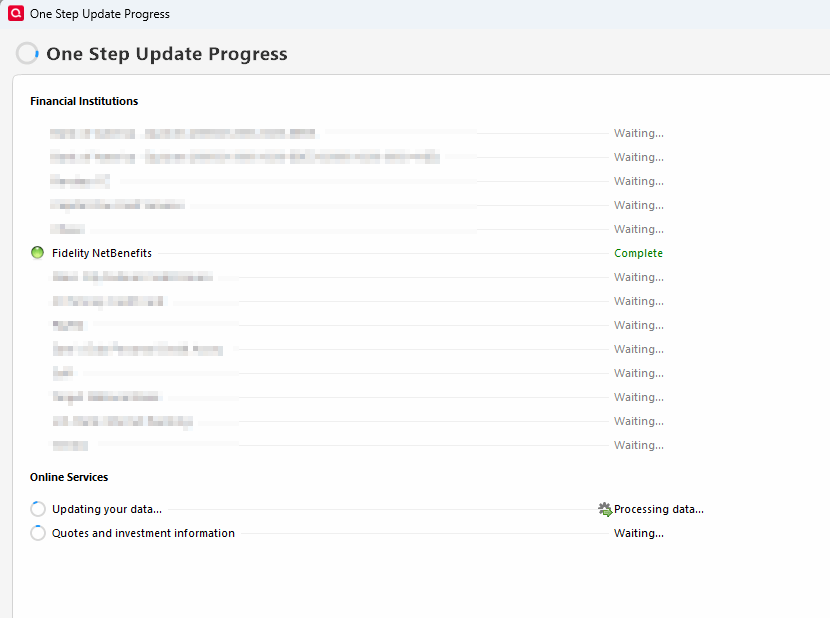
Below is a screen snippet. It usually completes Fidelity and then hangs on "Updating your data".
I did try only syncing "Quotes and investment information", and it completed
—
dmullig
Comments
-
@dmullig another thing to try is making a copy of your data file using Quicken's "copy file" process. This process cleans up some data file corruption and allows a "fresh start" for online connections. You will need to reactivate online connections for all accounts in the new data file (copy).
- Make a backup of your data file. Also, make backups during this process, just in case you need to go back a step.
- Do a Quicken "Copy File" to create a copy of your data file. This process forces a rewrite of code and fixes some file corruption issues. It will also clear out online connection "remnants" for all accounts. Click on File → Copy or Backup File, and select "Create a copy or template", and then click Next.
- On the next screen, leave the defaults as is. You can change the new file name and location, if you wish. Click on "Save Copy".
- During the copy process, you will be asked to provide a password for the new file. If you don't want a password, hit ESC.
- When the process completes, switch over to the new data file (copy).
- Reactivate online services for all accounts in the new data file, by using “Add Account” (do not use “Set up now” on the Online Services tab of Account Details) and carefully link to existing accounts in Quicken.
3 -
Thanks! I’ll definitely give that a try. I wasn’t aware the Quicken Copy does that.
—
dmullig
0 -
To give an update, the Quicken Copy did work just as you said. Thank you so much.
I ended up opting to restore from an older backup, though, even though I'll have to re-enter more transactions that were already entered in Quicken and Quicken Mobile (which also had to be refreshed instead of sync'd). I have many more downloaded but-not-yet-unreconciled transactions than transactions to re-enter, and all those went away with the Quicken Copy. I really need to catch up on those.
Thanks again!
—
dmullig
0 -
@dmullig it seems like you have everything up and running in good order again. I didn't quite understand this comment -
I have many more downloaded but-not-yet-unreconciled transactions than transactions to re-enter, and all those went away with the Quicken Copy. I really need to catch up on those.
If you experience and further issues down the road, please don't hesitate to circle back.
0 -
Yes, I am back up and running.
I don't have downloaded transactions automatically added to the register. I go through each one to make sure it gets categorized properly, often splitting the transaction into different categories. There are a couple accounts I haven't done that in a couple months…well, a few months now.
—
dmullig
0 -
@dmullig thanks for the clarification. I do the same thing. If I get behind, I go ahead and post the transaction in the account register. I then flag it and put a note in the MEMO field so I know that I need to go back and split the transaction into categories. I have also created a report that lists out any uncategorized transactions so I can be sure that I didn't miss any.
0 -
Another great tip! I have done that in the past, putting ??? in the memo to signify I didn't check the receipt yet. Didn't think about leaving it uncategorized; I just put it as Misc, unless it was obvious like McDonald's or something like that.
The dashboard that comes up when I first start Quicken has a card, Uncategorized Transactions, Last 90 days. So that would be a good reminder to get caught up. lol
—
dmullig
0
Categories
- All Categories
- 56 Product Ideas
- 36 Announcements
- 225 Alerts, Online Banking & Known Product Issues
- 22 Product Alerts
- 702 Welcome to the Community!
- 671 Before you Buy
- 1.2K Product Ideas
- 53.7K Quicken Classic for Windows
- 16.3K Quicken Classic for Mac
- 1K Quicken Mobile
- 812 Quicken on the Web
- 111 Quicken LifeHub
