Report to Show Only All Outflows

bayoyong
bayoyong Member ✭✭✭
edited September 4 in Reports (Mac)

Hi. I would like to create a report that shows all of my personal (not biz) money spent in a month by payee. I have a number of cc's and then pay some things directly through my checking account. I can't figure out a way to just show outflows and no inflows. Is there an easy way to do this? TIA.

Quicken Classic for Mac Biz and Personal

Tagged:

Comments

  • Quicken Jasmine
    Quicken Jasmine Quicken Mac Subscription Alumni ✭✭✭✭

    Hello @bayoyong,

    Thanks for reaching out with this question!

    To create a report showing only your personal outflows (spending) by Payee, you can check out the steps below to see

    1. Go to the Reports menu. Screenshot 2025-08-04 at 11.26.56 AM.png
    2. Select Transaction, then choose Transactions by Payee.
    3. When the report opens, click the Edit button in the upper right.
    4. In the Edit Report window:
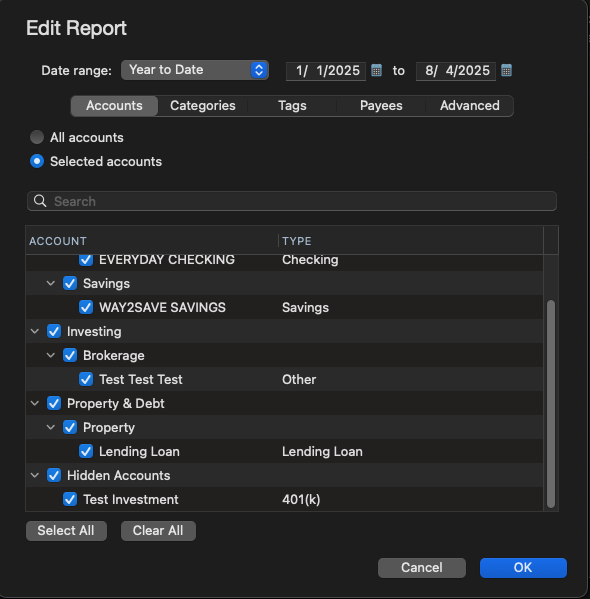
      • Go to the Accounts tab and select only your personal accounts (checking, credit cards, etc.). Screenshot 2025-08-04 at 11.17.07 AM.png
      • Go to the Categories tab and uncheck all income categories (such as Salary, Interest, Dividends, Refunds, etc.). This is the key step to removing inflows.
      • Optionally go to the Tags or Payees tab if you want to further filter the report.
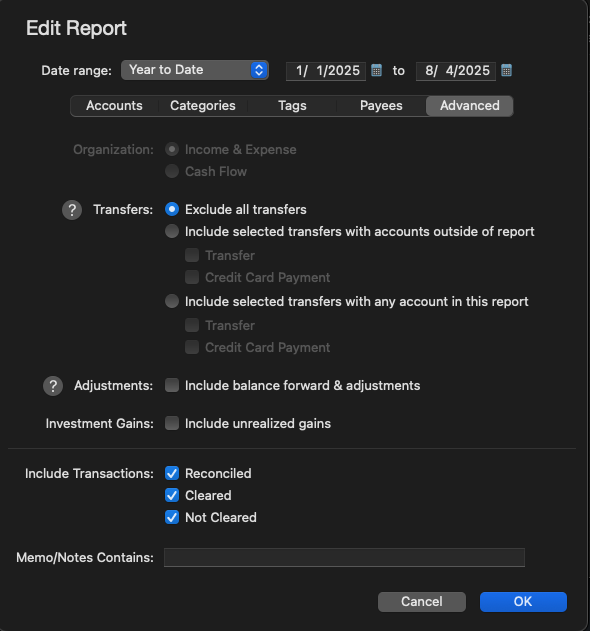
      • Go to the Advanced tab:
        • Under Transfers, choose Exclude all transfers if you don’t want any internal movement of money showing up. Screenshot 2025-08-04 at 11.20.02 AM.png
        • Leave the other options (Adjustments, Investment Gains, etc.) unchecked unless you have a reason to include them.
        • Under Include Transactions, leave all three boxes checked (Reconciled, Cleared, Not Cleared), unless you specifically want to filter by status.
    5. Click OK to apply your changes.

    This will give you a report of only money going out, grouped by Payee, with no income or transfers included. It’s ideal for seeing where your personal spending is going each month.

    I hope this helps!

    -Quicken Jasmine

    Make sure to sign up for the email digest to see a round-up of your top posts.

This discussion has been closed.