This morning zzz- appeared before Fidelity Investments when updating
Anyone know why they added zzz?
Thank you for the follow-up @Mark McIntyre,
I apologize for the delayed response. I did not receive notification that you'd responded. It doesn't look like you tagged me. Thank you for posting again and bringing it to my attention! Also, thank you for sending logs. However, we do still need the screenshots I requested in my initial post to be able to investigate the issue.
Please provide the following screenshots:
If you are not comfortable posting them to this discussion, please use a Problem Report to send them (Help>Report a Problem).
Thank you!
(CBT-754)
Somehow after converting to EWC+ I ended up with ReinvDiv transactions for Vanguard Federal Money Market Fund in my Fidelity HSA. This fund is not available for Fidelity HSAs! Anyone else notice this, or did I do this unintentionally?
And Reconcile Shares does NOT see this discrepancy! It only notes a difference in FDRXX.
Does anyone know of any resolution? Even my Merrill account which I deactivated and then reactivated with direct connect does not download updated quotes. Fidelity via Express Web+ is at least updating quotes although interestingly only about 90% of them.
I don't think reconcile shares is working at all. If you go to Tools > Online Center, then select "Fidelity Investments" under Financial Institution, and you click on the "Transactions", "Balances" or "Holdings" tab, all of mine say "as of 07/30/2025 03:30:03". This is the case even though I migrated to EWC+, deactivated EWC+, used the workaround to use Direct Connect (which forced Simple Tracking), deactivated DC (Simple Tracking), and reactivated EWC+.
Clearly something is very wrong, and it doesn't look like this was tested well at all. It is saying something that they "turned off" the "voluntary" migration from DC to EWC+. I just wish they would allow us to reactivate on DC the "normal" way (or in a way that would allow us to use complete tracking).
This is what I see for my accounts that are now EWC+
Until the new authorization is working properly, please don't discontinue the use of zzz-Fidelity Netbenefits and
Until the new authorization is working properly, please don't discontinue the use of zzz-Fidelity Netbenefits and zzz-Fidelity Investment - DC.
I followed the suggestion to restore older backup and the zzz download is working.
It's possible this is the reason, except that it happened again after deactivating the account and reactivating, it downloaded lots of transactions but not the ones on July 31st. Also someone else reported the same issue. Finally, when I created a new file and recreated this account using DC, it did download all the transactions correctly.
According to their support forum on Reddit, Fidelity has acknowledged the problem and is also working towards a solution:
https://www.reddit.com/r/fidelityinvestments/comments/1mddpq1/quicken_connection_to_fidelity_changed_today/
My Fidelity 401(k) account recently quit downloading transactions. When I attempt to connect, it downloads one of the six recent purchases, but without any security details. I tried disconnecting and reconnecting the account, but it still doesn't work.
Has anyone else seen this problem, and is there a fix available?
After the recent mandatory re-authorization of Fidelity accounts, the transaction download is completely broken (all four accounts I have). For example, 5 buys of mutual funds on the same day result in a single transaction download with only one of the five buys, showing only the amount, and no other information (no ticker symbol, no fund name, no number of shares, etc).
Deactivating and reactivating the accounts doesn't fix the problem.
Please fix it. This is one more time where transaction downloads from major investment houses gets broken.
401 (K) contributions and subsequent buys are missing. In brokerage account, reconcile does not work as Quicken thinks that a money market fund is a cash balance even though it shows as an investment with a balance. Completely broken - did no one test this new interface = I have 5 fidelity accounts- all are broken - this needs to be a P1 system down hot patch!!!
Actually mine is Quicken Mac 8.2.1 - not sure how this got in the Windows post
They did, after initially trying to push the blame on to Quicken.
Off topic: this latest rounding of Fidelity account shares to 2 decimal places reminds me of the issue with Vanguard account shares rounding to 3 instead of the 4 places used in some parts of Vanguard's website. What's being done to fix that? Or am I forever going to have to manually stick in that 4th digit for all transactions at Vanguard?
This is ChatGPT response
Quicken for MAC creates two registers if Fidelity sends cash data:
That's not happening. I confirmed with Fidelity technical support that cash data is sent. I get both cash (banking) and investment (Brokerage) transactions in a single register in quicken for Mac. I would like two registers as indicated in the ChatGPT response. Please fix this issue.
So whats the current status here for this? I didn't do anything with my Fidelity accounts (I have Netbenefits and regular accounts) at all, not even downloading transactions since I saw all the threads.
I saw Quicken paused the voluntary and now has unpaused it. I almost tried a (started) download, saw that it has already changed to zzz-Fidelity DC for the connection type without me doing anything directly. I canceled the download it as I certainly don't have a warm fuzzy. I never got to any message of optional conversion from the program.
Same thing happened to me. Fidelity transactions stopped downloading on-or-about Aug 2nd,
@John QW You should be safe downloading using zzz-Fidelity Investments-DC. That's the temporary name they gave to their Direct Connect (DC) connection method (what you've been using all along) in prep for their conversion to EWC+. When the transition proved to be a total mess, they stopped offering the ability to convert to that method which is why you haven't seen the message to optionally transition. I, and many other people are using zzz-Fidelity Investments-DC without problems, and I, for one, will continue to do so until Quicken & Fidelity clean up their act.
Still doesn't show the downloaded core balance. Still hasn't downloaded the July 31 transactions for matching. Quicken should keep the ZZZ-Fidelity option available for setup until the revised process is working.
I've finally made it through the issues with the migration of Fidelity accounts from Direct Connect to EWC+, or so I thought. I have a 401k account from a previous employer that has been managed by Fidelity for many years. Since this migration, I no longer get the NAV's updated. I've validated my data file. I've Super validated the data file. I've reset the Fidelity accounts. I've signed in as a different user for the Quicken cloud account via the Preferences. I've copied the whole data file to a test data file and re-authenticated. Nothing works.
I do see these error message in the QCSlog.txt file that have started appearing every time I try to download transactions for the 401k account.
################### Thursday, August 7, 2025, 11:06:26 ##################### ERROR:OFXRequestData::SortTransactions - Exception message Value cannot be null. Parameter name: key at System.Collections.Generic.Dictionary`2.FindEntry(TKey key) at Quicken.Features.OFXConverter.Model.OFXRequestData.SortTransactions()
I should point out that the mutual funds in this 401k are non-public ones (don't ask) but that has never been a problem before. Does anyone have any other suggestions?
@mrzookie
Thanks. I thought so but I wanted to get a double check. Download went fine on zzz.
Fare thee well Direct Connect… warts and all its performed better than its replacement so far.
So once one has a failed attempt to convert to EWC+, HOW does one then revert to zzz-Fidelity Investements-DC without using a backup file and starting all over?
You really can't. There is a way to "force" (deactivate EWC+, then change the financial institution in account settings to read "zzz-Fidelity Investments - DC" and then activate the account), but that method of "forcing" DC results in the account being locked into "Simple Tracking". If you are okay with Simple Tracking, that is an option (but if you wanted Simple Tracking, you likely wouldn't be asking).
If you want DC and "Complete Tracking", right now, you need to restore from a backup. Once an account has been activated on EWC+ (even if you deactivate it), it does not appears to allow DC + complete tracking again. However, when you do that, any other EWC+ accounts will need to be reauthorized (which is also a pain).
Hopefully at some point, Quicken, Fidelity and all of the intermediaries fix this issue, and all transactions during this "gap period" also flow through properly.
As previously reported in Aug 1, 2025, on Fidelity OSU today 8/8/25, Quicken is ROUNDING the number of SHARES on transactions from Fidelity to TWO DECIMAL PLACES while Fidelity reports THREE DECIMAL PLACES. This causes reconciliation errors, and each transaction has to be edited to correct the issue. I uploaded details on this with reference to CTP-13955.
😕
There actually is a way, although I wouldn't recommend it unless you are an expert. I take no responsibility for the results. It still relies on a backup but you don't have to re-enter any data. Unless we see that EWC+ is going to be postponed, there is little benefit to doing what you are about to read - it's a lot of work that will only give you a reprieve for a couple of weeks. The good thing about doing this is that the new file you create is completely independent from your original file, so you can always go back to the original file if it doesn't work out for you.
(0) Make a backup of your file using the "Create a complete backup" option. This will enable you to go back to where you were before if this process doesn't work for you and you don't want to have to reactivate download for the Fidelity accounts.
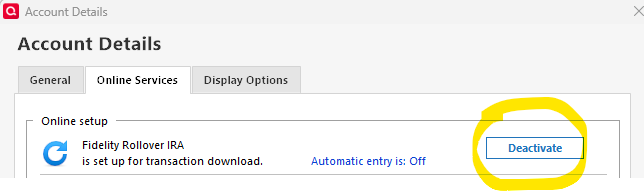
(1) In the affected accounts, deactivate account download
(2) Go to the General tab on this menu, clear the Financial Institution name and click OK.
(3) Open up this tab again and type in "zzz-Fidelity Investments - DC" or "zzz-Fidelity NetBenefits" depending on the type of account. Do this for all the affected accounts. If it keeps on populating it with "Fidelity Investments" then perform this step after step (7).
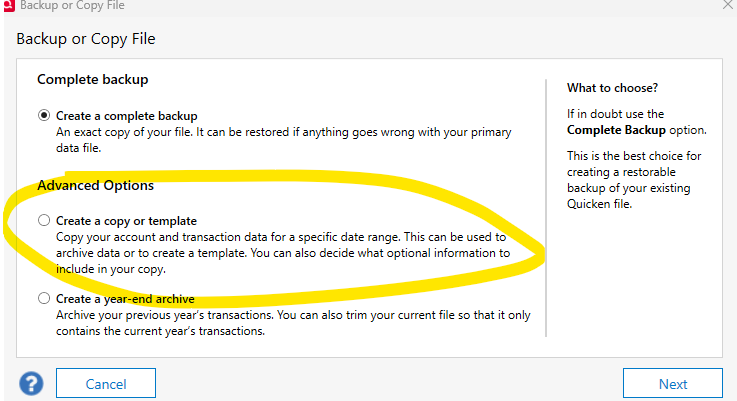
(4) Do this kind of copy and select all dates.
This type of copy is different from a backup, in that it completely separates your file from any online activity you previously had. This is different from complete backup and restore, which does maintain the online connections and activity, and you must NEVER restore two backups and use both of them concurrently. However if you do the "Create a copy or template" it won't interfere with any other file you have. (5) If you get a warning, tell it to proceed.
(6) When it's complete, open the new file and check that the accounts are all present and that the balances are the same as before
(7) You will notice that all of the accounts (any account - not just Fidelity) are no longer set up for download, so you will have to do that all over again. Make a note of the opening balance before you do this, because the setup may adjust the opening balance (you will know this has happened if you can't reconcile correctly).
(8) You will also notice that all of your online bills in Bill Manager have disappeared if you use this, so they will have to be set up again too. Step (7) and Step (8) are the main reason I don't recommend doing any of this unless you have lots of available time and really know what you are doing.
This did work for me, except that, for some reason, I couldn't clear "Fidelity Investments" from my 401k plan. All of the other accounts were able to be set up as DC WITH Complete tracking. So I ended up going back to my original file and sticking with EWC+.
Thanks! I didn't try that. I don't use bill manager, so #8 isn't relevant to me, but I have done a full "copy" as you mentioned and reactivating and relinking all accounts is kind of a pain. Personally, I only have a few transactions per month in Fidelity, so I am going to wait and see what happens, and keep your instructions as a backup.
My merrill accounts will not update quotes. I tried it on one computer with direct connect and another with express web + . I tried to "reauthorize" account but I get an error message on the DC account that the service will not let me do that and nothing when i click the box on the EW+ account. All started late July with the rest of the horror.
addendum: even if I start from scratch with a new account and try to add Merrill it won't let me connect. Getting a 'sorry not your fault" I can connect easily on the web. Sigh. Any updates from anyone? I don't even dare try my Fidelity connections
I have a Fidelity checking account, which shows up as an Investment account, so I chose to create an associated Cash account where all the activity is recorded. This worked fine until the recent EWC+ update. Now the cash account still shows Financial Institution as zzz-Fidelity Investments - DC and no transactions are downloading. How can I fix this, please? Thanks! -Doug