How delete multiple investment transactions?

rteasda
rteasda Quicken Windows Subscription Member

I need to delete a series of transactions that are erroneous. There are 88 related transactions that were generated when I removed and re-added a security that was reclassified by the mutual fund company that issued it (Lord Abbett). The number of shares and $ value shown in the portfolio are correct but the cost basis and gain/loss are now wildly off from what they should be. I would like to know if I can delete the incorrect transactions and re-enter them so that everything is correct. Quicken is not allowing me to select multiple transactions so I would have to manually delete each of the 88 transactions individually. Thanks for any suggestions!

Answers

  • Jeff76
    Jeff76 Quicken Windows Subscription Member ✭✭✭✭

    Here is suggestion that you might want to think about, go to your account in question and sort in a way that all you entries are all together that you want to delete and try the ole hold shift key while pressing the left mouse key. You can highlight a bunch of entries and then hit the delete option. I'm not sure if that works in Quicken, as I have never tried it. Might be worth a try.

  • Quicken Kristina
    Quicken Kristina Quicken Windows Subscription Moderator mod

    Hello @rteasda,

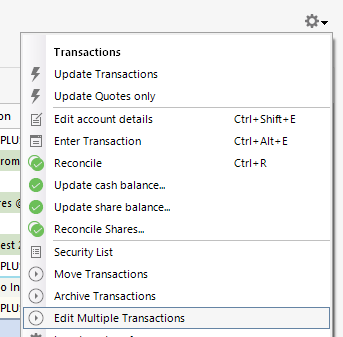
    Thank you for reaching out to the Community with this question. The suggestion @Jeff76 gives will work for banking registers. For investment account registers, to select multiple transactions, click the gear icon near the upper right of the register and select Edit Multiple Transactions.

    Screenshot 2025-08-08 at 1.28.50 PM.png

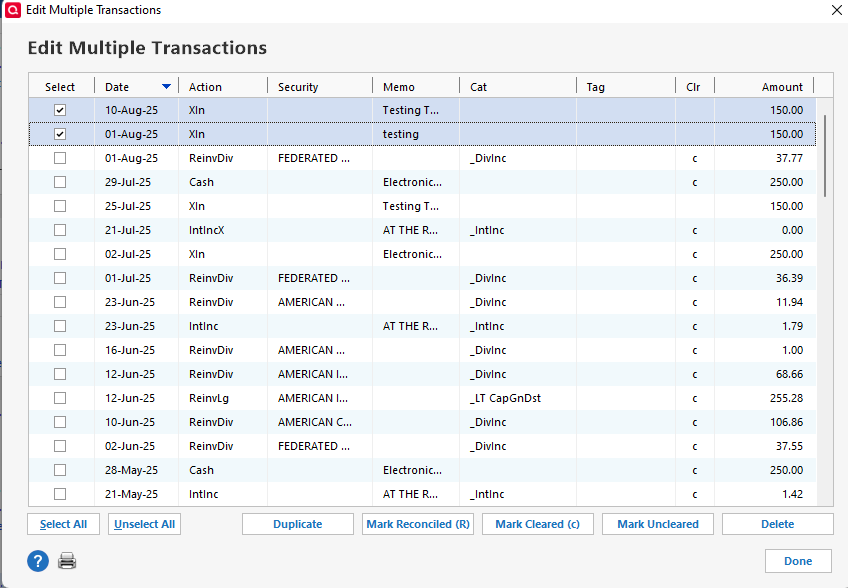
    The window that comes up will allow you to select and delete the problem transactions.

    Screenshot 2025-08-08 at 1.29.59 PM.png

    Note - It is wise to make a backup prior to deleting transactions. That way, you have a good restore point if needed.

    I hope this helps!

    Quicken Kristina

    Make sure to sign up for the email digest to see a round up of your top posts.

  • q_lurker
    q_lurker Quicken Windows Subscription SuperUser ✭✭✭✭✭

    Tell me more —

    Are these 88 transactions because there are 88 lots of these reclassified mutual funds?

    Did you remove the old holdings (Remove Shares" and add the new holdings (Add Shares) with 88 transactions?

    Are the 88 transactions Add Shares transactions that lack cost basis information and likely also lack Date Acquired information?

    How are you intending to get the right cost basis information entered?

    It sounds like you needed to use a Mutual Fund Conversion action. Is that your intent?

  • rteasda
    rteasda Quicken Windows Subscription Member

    Thanks, Quicken Kristina. I had already tried Shift + click, of course, and knew it doesn't work. Edit Multiple Transactions is what I needed to know. Thanks again!

  • Quicken Kristina
    Quicken Kristina Quicken Windows Subscription Moderator mod

    I'm happy to help!

    If you need further assistance, please feel free to reach out!

    Quicken Kristina

    Make sure to sign up for the email digest to see a round up of your top posts.

This discussion has been closed.