Fidelity Cut-Over Migration - Duplicate account and duplicate transactions
Ever since the changeover, my Quicken has been broken
It created a new account with about a year's worth of transactions and did not connect to my existing Quicken account. This means that my totals are all messed up because of a duplicate account.
The zzz account has all my historical transactions and is still downloading new transactions, where the new account is not downloading new transactions.
Is this being fixed? Do I need to call support? What a mess. I didn't ask for this 'upgrade' but now I am suffering the consequences.
I have many hundreds of transactions - what should I do?
Comments
-
@Nickhull when you migrated over to the new connection, the account mapping was left at the default "Add new" rather than changed "Link to existing". The end result is that new accounts were created.
Also, the existing accounts are still connected with Direct Connect (old method) and the new accounts are connected with Express Web Connect+ (new method).
The ease or difficulty of correcting this depends on how many accounts are involved and how long ago you migrated your accounts. The other consideration is the issues currently with the Fidelity migration to the new method (EWC+). Even if you unraveled this issue with your Fidelity accounts, that doesn't gurrantee that your accounts will work properly with the new connection method.
Because of the situation, I would suggest contacting Quicken Support.
0 -
@Nickhull the other option that may be a viable solution since your old accounts are still updating, is to simply delete the new accounts that were created if the old accounts are still in balance and reconciled.
But again, I would suggest contacting Quicken Support. They can remotely view your Quicken set up and accounts and better determine what state your accounts are in.
0 -
Firstly, I didn't migrate this data - Quicken did it automatically. Second, I didn't see anything about "add new", so how could I choose "Link to existing" - all of these items happened automatically as part of a forced upgrade. If there was a user choice and I missed it, also, you have to understand that I don't have knowledge of your internal systems and I am very cautious that things don't get deleted. I have almost 30 years of financial history in Quicken.
Leaving something that has a 'zzz' prefixing it, makes me worried that this is just pushing things down the road if they eventually get deleted.
0 -
I cannot find a support phone number. How do I get support?
0 -
@Nickhull it turns out that you got caught in a myriad of issues that a lot of Fidelity account holders are experiencing right now with the migration to a new connection method - Express Web Connect+ (EWC+)
Here is a link to a very long thread that discusses the issues -
Here is a Quicken Alert on one of the issues -
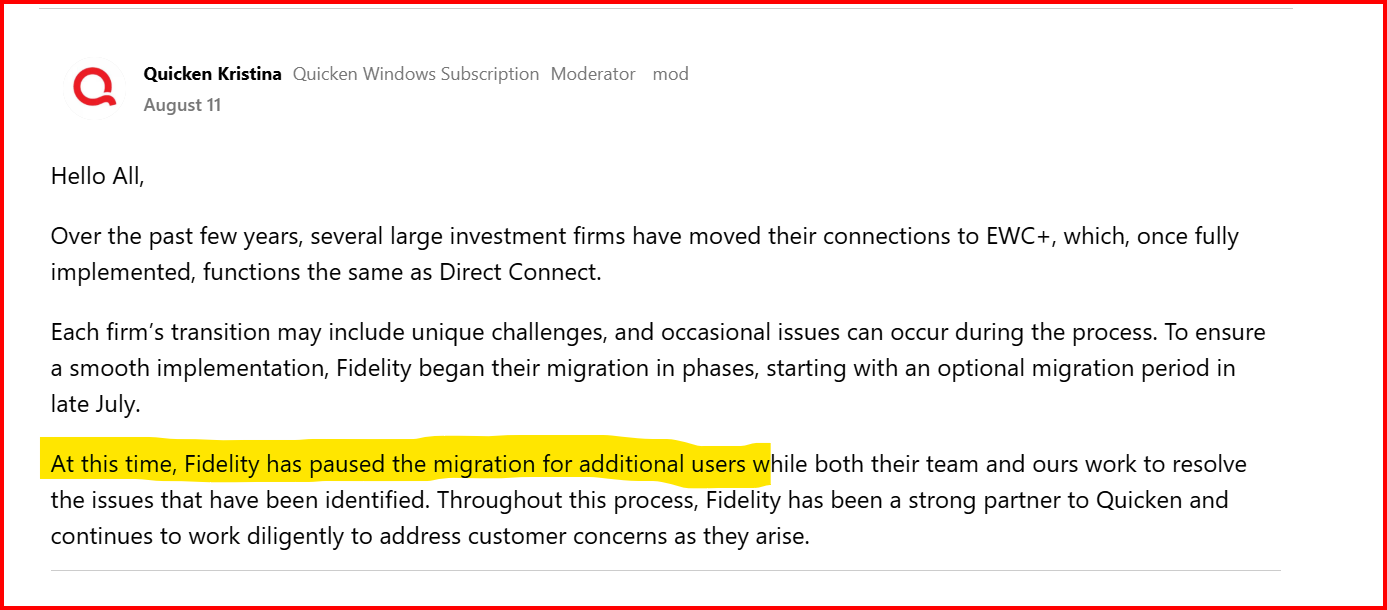
Here is a message from Quicken that the migration to EWC+ has been paused. I am not sure if that means the forced cutover date of 8/20/25 has also been pushed out.
There is a lot of discussion and information to go through in these threads. You might want to add your issues and questions to the thread "zzz Fidelity Updates".
Also, here is the link to contact information for Quicken Support -
You can also find this contact information when you click on "Support" in the menu options here in the Quicken Community, or in Quicken, if you click on Help → Contact Support
1 -
@Nickhull here is another thread on this topic you might find interesting -
This is another thread you can add your questions or concerns to and hopefully find solutions.
I know I have given you a lot of information, but hopefully it will help your situation with Fidelity.
Best of luck.
0
Categories
- All Categories
- 56 Product Ideas
- 36 Announcements
- 225 Alerts, Online Banking & Known Product Issues
- 22 Product Alerts
- 703 Welcome to the Community!
- 671 Before you Buy
- 1.2K Product Ideas
- 53.7K Quicken Classic for Windows
- 16.3K Quicken Classic for Mac
- 1K Quicken Mobile
- 812 Quicken on the Web
- 111 Quicken LifeHub