Principal Financial 401(k) shows wrong balance

Geiswood
Geiswood Quicken Mac Subscription Member ✭✭

When I add the electronic, automatic download of my 4019k) account at Principal Financial, it shows the wrong balance. It has doubled my holdings! (wish this were true) It shows a cash balance that is almost the same as my investments. I can not find a way to edit this cash balance in my Quicken account.


«1

Answers

  • Geiswood
    Geiswood Quicken Mac Subscription Member ✭✭

    If I disconnect the account, I can delete the starting cash balance, but it reappears as soon as I reconnect. This appears to be related to the fact that I initially set up a manual 401 (k) account in Quicken. Although I have deleted this account (twice), Quicken can't seem to forget that initial account balance.

    Help!

  • cpmassen
    cpmassen Quicken Mac Subscription Member ✭✭

    I am having the exact same issue, I worked with phone support on this for several hours and they couldn't fix it. Even creating a new account and downloading details gave the double balance.

  • Qkn for Mac User
    Qkn for Mac User Quicken Mac Subscription Member

    This is a new issue for me as well. Principal doesn't allowed "detailed" tracking, only simple. It seems there was a change in how they are interacting with Quicken that created this issue.

  • Quicken Anja
    Quicken Anja Moderator mod
    edited September 23

    Hello All,

    Thank you for taking the time to report this issue!

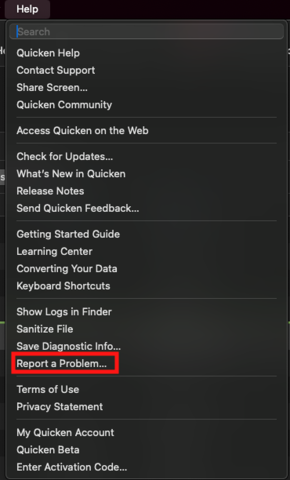
    We have forwarded this issue to the proper channels to have this further investigated. However, we request that you please navigate to Help > Report a problem within your Quicken program and submit a problem report with log files and screenshots attached in order to contribute to the investigation.

    image.png

    It would also aid the investigation to include a sanitized file when submitting the problem report. A sanitized file is a data file that removes personally identifiable information so you can comfortably share this file with the Quicken team.

    While you will not receive a response through this submission, these reports will help our teams in further investigating the issue. The more problem reports we receive, the better.

    We apologize for any inconvenience in the meantime! Thank you.
    (CBT-766/CTP-14320)

    -Quicken Anja
    Make sure to sign up for the email digest to see a round up of your top posts.

  • cpmassen
    cpmassen Quicken Mac Subscription Member ✭✭

    Great thank you Anja, when I spoke with support earlier this week I gave them all the screenshots that they wanted as well as sent all the data logs. They worked and then escalated so I am hopeful if more people submit their errors we can get the details needed to fix this. It is an issue with the Simple tracking for sure, because when I switched over to the new way to download transactions the discrepancies started.

  • Geiswood
    Geiswood Quicken Mac Subscription Member ✭✭

    I have submitted a "report problem" request as Anja suggested, including log files and sanitized data file.

  • Quicken Anja
    Quicken Anja Moderator mod

    @cpmassen & @Geiswood Thanks for submitting those problem reports! I’ve attached both of your files to the ticket so our team has everything needed to investigate further.

    -Quicken Anja
    Make sure to sign up for the email digest to see a round up of your top posts.

  • Quicken Anja
    Quicken Anja Moderator mod

    Hello again,

    Our escalation team is requesting a screenshot of what you see when viewing your 401(k) directly on the Principal Financial website, so they can compare it to what’s populating in Quicken.

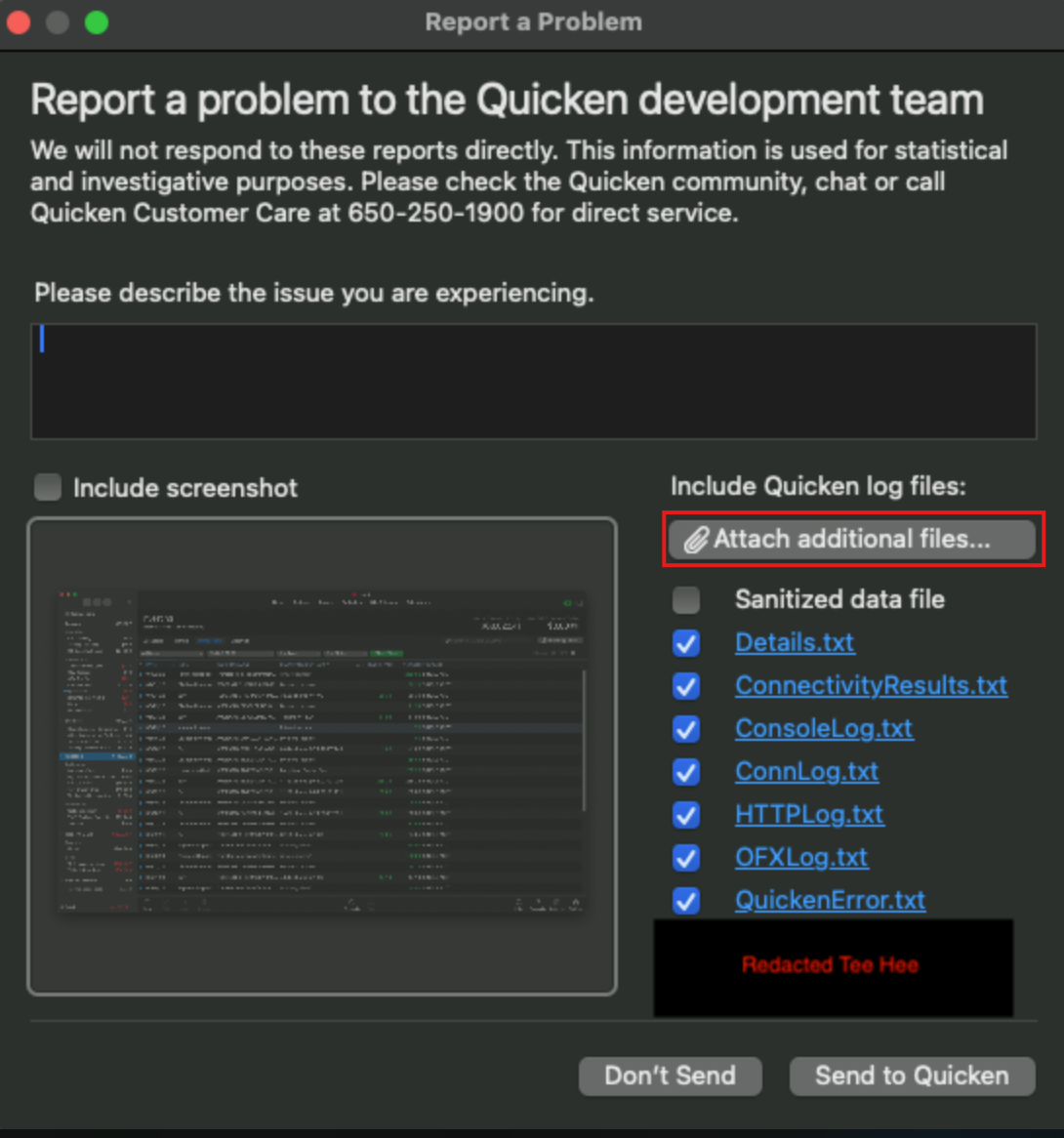
    To submit it privately and securely, please go to Help > Report a problem > Attach additional files.

    image.png

    Once submitted, please reply here and let me know so I can confirm it’s been received and get it added to the ticket.

    Thank you for your continued patience and assistance as our teams work to get this resolved!

    -Quicken Anja
    Make sure to sign up for the email digest to see a round up of your top posts.

  • jcrandall6
    jcrandall6 Quicken Mac Subscription Member ✭✭

    Hello @Quicken Anja - I am also having the problem with Principal 401k adding a cash balance that is not part of my account. I submitted a problem report at 10:04am ET 8/17 and included the sanitized file and a screenshot of my Principal 401k account website. I hope this helps them identify the issue.

  • Geiswood
    Geiswood Quicken Mac Subscription Member ✭✭

    I submitted a pdf and a screenshot of my correct Principal account balance.

  • Geiswood
    Geiswood Quicken Mac Subscription Member ✭✭
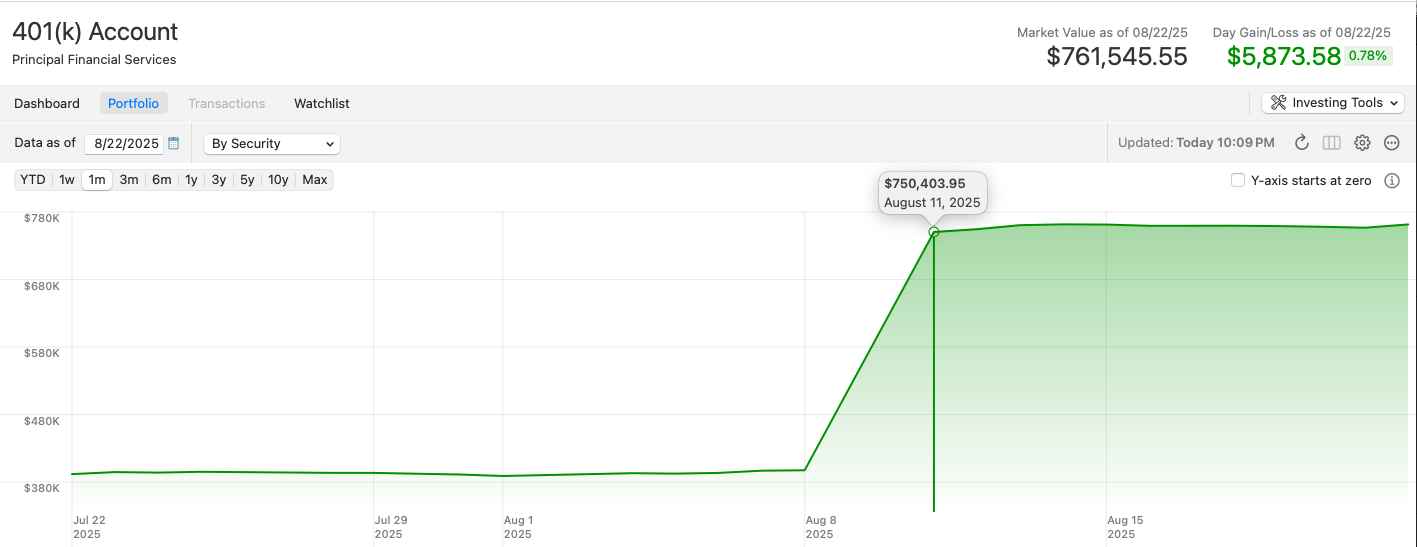
    Screenshot 2025-08-23 at 10.11.15 PM.png

    In my case, the error first occurred on August 11th.

  • Geiswood
    Geiswood Quicken Mac Subscription Member ✭✭

    I hope this turns out to be an easily fixable software bug and not a sign of something fishy at Principal.

  • meatchuck
    meatchuck Quicken Mac Subscription Member ✭✭

    I am having the same problem, beginning when I reconnected/updated my Principal account on Quicken today. I also submitted a sanitized report to Quicken with a screenshot.

  • Quicken Anja
    Quicken Anja Moderator mod

    Hello @meatchuck,

    Thank you for letting us know and for submitting the report with a screenshot. I’ll make sure to get those added to the ticket for our teams to review.

    We appreciate your help!

    -Quicken Anja
    Make sure to sign up for the email digest to see a round up of your top posts.

  • thoff
    thoff Quicken Mac Subscription Member

    I've reported this problem this afternoon with logs and sanitized data file and a screenshot from Principal. Any status on when this bug will be fixed?

  • Quicken Anja
    Quicken Anja Moderator mod

    Hello @thoff,

    Thanks for chiming in and submitting your files. I’ve added your details to the ticket. There’s no ETA at this time, but the ticket is open and actively being worked on.

    Thank you!

    -Quicken Anja
    Make sure to sign up for the email digest to see a round up of your top posts.

  • mk0
    mk0 Quicken Mac Subscription Member ✭✭

    I'm having the same issue. What's the status?

  • Quicken Anja
    Quicken Anja Moderator mod
    edited September 12

    Hello @mk0,

    Thanks for reaching out! At this time, there’s still no ETA for a fix, but the ticket regarding this issue is open and actively being worked on by our teams.

    We appreciate your patience while they continue investigating this.

    Thank you!

    -Quicken Anja
    Make sure to sign up for the email digest to see a round up of your top posts.

  • meatchuck
    meatchuck Quicken Mac Subscription Member ✭✭

    I did find a workaround today for this problem. I went into my Principal 401k transactions list in Quicken and found and deleted the cash transaction that Quicken had added when this whole problem began. It was for the full value of my original balance, thus doubling my balance. When I deleted that transaction the problem was fixed and my Principal balance in Quicken is back to normal. Hoping this works for others that are having the same issue!

  • mk0
    mk0 Quicken Mac Subscription Member ✭✭

    Doesn't work for me. Only simple tracking is selectable for me. There is no way to adjust transactions. For me it continues to get worse. Cash contributions continue to accumulate even as new fund investments are made.

    Team Quicken - What's the latest on this issue?

  • jcrandall6
    jcrandall6 Quicken Mac Subscription Member ✭✭

    Agree, still broken, and I cannot delete cash transactions as my 401k only allows "simple tracking", same as mk0 above. It would be very nice if the product I am paying for would show accurate balances.

  • Quicken Anja
    Quicken Anja Moderator mod

    Hello All,

    I completely understand how frustrating it is to still be running into this issue, and I know it can feel discouraging to keep checking in without seeing new information. At this time, I don’t have any updates to share beyond what I’ve already provided — the ticket for this issue remains open and is actively being worked on by our teams.

    In the meantime, we truly appreciate your continued patience and the reports you’ve submitted, as they are very helpful to the investigation.

    Thank you!

    -Quicken Anja
    Make sure to sign up for the email digest to see a round up of your top posts.

  • geekpgh
    geekpgh Quicken Mac Subscription Member

    Just adding that I too have this issue. Quicken is double counting my principal 401k portfolio. It has a "cash" asset that is equal to all the equities combined. That makes the whole account appear twice the size it truly should be.

    If I attempt to turn on "detailed" tracking quicken says it will unlink the account and make it a manual account. So I cannot edit any transactions to work around the issue. There is also no way to "reconcile" the account.

  • redvw
    redvw Member ✭✭✭

    I have the same issue.

  • redvw
    redvw Member ✭✭✭

    Using the Option key on the Mac keyboard, hold this key, then select the greyed-out transaction tab. You can then delete the cash adjustment, but when you update your downloaded transactions, it will reappear.

  • mk0
    mk0 Quicken Mac Subscription Member ✭✭

    Interesting, but that's not even a practical workaround. As you pointed out, they reappear on the next download.

  • Geiswood
    Geiswood Quicken Mac Subscription Member ✭✭

    Update: It's been over two months since I first reported this error. Still no resolution. Sending encouragement to the team…

  • Quicken Anja
    Quicken Anja Moderator mod

    Hello All,

    Thank you for continuing to provide updates and feedback. At this time, I don’t have any new information beyond what I’ve previously shared. The escalation ticket for this Principal 401(k) issue remains open and actively being worked on by our teams.

    We truly appreciate your patience and all the problem reports, screenshots, and sanitized files you’ve submitted—these are very helpful in the ongoing investigation.

    Thank you again for your understanding and continued participation!

    -Quicken Anja
    Make sure to sign up for the email digest to see a round up of your top posts.

  • Geiswood
    Geiswood Quicken Mac Subscription Member ✭✭

    Just upgraded to Quicken Classic for Mac 8.3.3

    This issue remains unresolved.

  • mk0
    mk0 Quicken Mac Subscription Member ✭✭
    edited November 15

    Updated to 8.3.3. Issue remains unresolved. What's the status of remediating this issue?