Improvements to Alerts

jedshawk1
jedshawk1 Quicken Windows Subscription Member
edited September 14 in Product Enhancements
  1. I would like to see the ability to have a choice for the display of the calendar order of alerts to either the first of the month or the last of the month on top.
  2. I would like to see the option of having the alert box pop up on opening Quicken.
  3. I would like to have the set up option for any amount of weeks so that you can have displayed the alerts for the next month also. Example: If you select 4 weeks to show, when you are in the 2nd week of the month, the alerts will show the first 2 weeks of the next month.

[Edit - Item 2 already exists in Quicken, see @UKR's comment below]

1
1 votes

Reviewed · Last Updated

Comments

  • UKR
    UKR Quicken Windows Subscription SuperUser ✭✭✭✭✭

    I would like to see the option of having the alert box pop up on opening Quicken.

    If you are talking about Alerts under control of Tools / Alerts Center
    You can do that today.

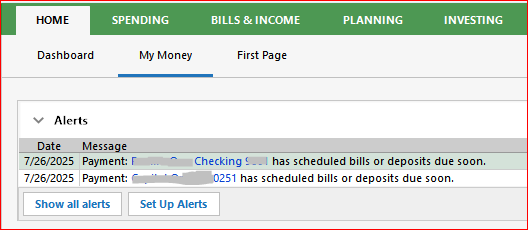
    • Customize an existing or create a new "classic" Home tab view. (I used the My Money view for the image below)
    • Add the Alerts view and move it to the top of the view page
    • In Edit / Preferences / Startup declare this Home tab view as the "On Startup open to …" view page
    image.png

    If you are primarily interested in seeing Scheduled Reminders coming due within the next xx days, try using the Bill and Income Reminders view which is part of (or can be added to) any Home tab classic view page (not the Dashboard view). Or, if you prefer, use the Bills & Income tab's Bills, Income & Transfers view, sorted by Due Date.