How to delete old Kohl's biller from Bills and Income Tab
I have a leftover Kohl's biller entry in my Quicken Windows Bills and Income tab from before the Capital One Transition (there is a separate new entry for that). Is shows up in the "Needs Attention" section but I can't remove it (I receive the "Quicken experienced an issue and this biller was not deleted…" message).
I've tried Review and Repair Online Billers (as well as the other Reivew and Repair options) and performed a SuperValidate on the file without avail.
Any other suggestions?
Thanks…
Answers
-
Hello @scsweet,
Thank you for letting us know you're encountering this issue. It sounds like you've already done the first couple steps to troubleshoot the issue.
When I check our internal tools, it looks like this Kohl's biller has been in pending status since 2024. Because of that, restoring a recent backup is unlikely to correct this issue.
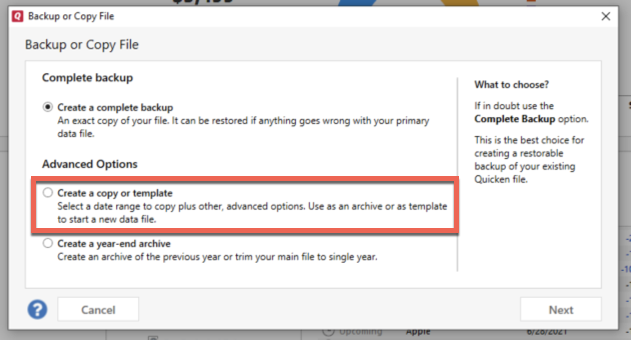
To continue troubleshooting, I recommend that you try creating a copy of your data file, which will rebuild all of the internal lists and database tables. If successful, you would then move forward with the copied file. To create a copy, please navigate to File > Copy or Backup File... > Create a copy or template (see examples below) which will also allow you to select a date range to move forward with.
If you wish to move forward with your entire data file, please check the full date range of your entire data file before copying so you can enter the correct date range if you do not wish to "shrink" your file by eliminating certain dates. Note - You should not need to "shrink" your file unless you believe that older data is the cause of the issue you're encountering.
It's important to know that all online services will be disconnected in the copied file, and you will need to sign back in with your Quicken ID and reconnect all of your online accounts, online billers, Quicken Bill Manager services, etc if you plan to use that copied file going forward. The reason for this is that the new copy also creates a new and separate dataset ID.
Please test to make sure you are able to delete the problem biller before reconnecting your accounts.
If the issue is not resolved in the copied file either, then feel free to switch back to your original file (for instructions on switching back to your main file, click here).
Please let me know how it goes!
Quicken Kristina
Make sure to sign up for the email digest to see a round up of your top posts.
0 -
Thank you, Quicken Kristina. I will look into your file copy suggestion.
1
Categories
- All Categories
- 56 Product Ideas
- 36 Announcements
- 223 Alerts, Online Banking & Known Product Issues
- 22 Product Alerts
- 701 Welcome to the Community!
- 671 Before you Buy
- 1.2K Product Ideas
- 53.7K Quicken Classic for Windows
- 16.3K Quicken Classic for Mac
- 1K Quicken Mobile
- 813 Quicken on the Web
- 111 Quicken LifeHub