Renaming rules, memorized transactions, etc

Gus F
Gus F Quicken Windows Subscription Member ✭✭

I have a number of different clients that send me payments over Zelle to my checking account. These come into Quicken something like:

Zelle Payment From John Smith For "for July"; Conf# 99abcdyz

I would like all payments from John Smith to go into a "John Smith" category. However, the memo and confirmation number part of the payee are different, so memorized transactions don't work.

I could use a renaming rule to convert this to simply "Zelle Payment From John Smith" but then I would lose the extra information. Ideally, I would want to put the payee memo and confirmation number into the Quicken memo field.

Is there any way to do this automatically?

Answers

  • [Deleted User]
    edited August 17

    @Gus F when I do a Zelle transaction, the extra information gets automatically posted to the Memo field.

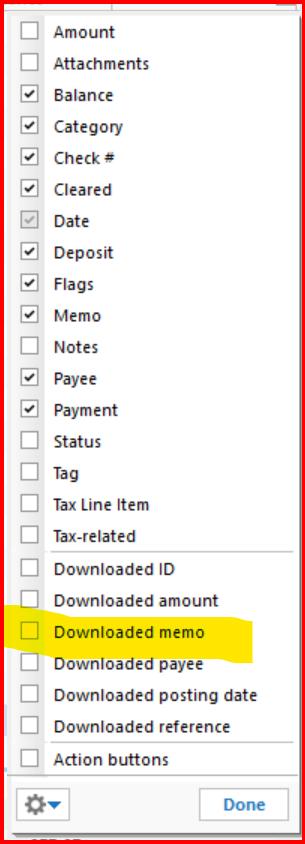
    If you look at the "Downloaded Memo" field is the information there? This is a special column that you need to add to your account register. This Downloaded Memo field will remain intact, even if the regular Memo field is overlaid.

    To add this column to your account register, click on the "little register" icon to the right of the Balance column. You then should see a list of column available to add or remove from your register.

    image.png

    Each bank may have their own Zelle process, so I can't guarantee that you will see the same thing in the Downloaded Memo column.

This discussion has been closed.