Matching downloaded items

Janet Tuttle
Janet Tuttle Quicken Windows Subscription Member

How do I get the bottom of my Quicken to show the “ Matching “ list of items? It’s a yellowish kind of box at the bottom.

Answers

  • Quicken Kristina
    Quicken Kristina Quicken Windows Subscription Moderator mod

    Hello @Janet Tuttle,

    Thank you for reaching out to the Community with this question. If I'm understanding correctly, you want to have your registers list the downloaded transactions at the bottom, below the register, so that you can review, and accept or match transactions as appropriate?

    If that is what you're wanting to do, then there are a couple options.

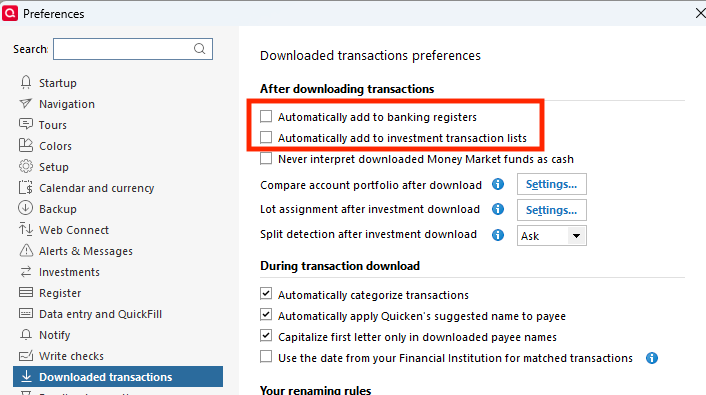
    1. If you want all your registers in your file to be like that, then navigate to Edit>Preferences>Downloaded transactions and make sure the option to "Automatically add to banking registers" is unselected. If you have investment accounts, then also make sure "Automatically add to investment transaction lists" is also unselected. Screenshot 2025-08-19 at 5.24.55 PM.png
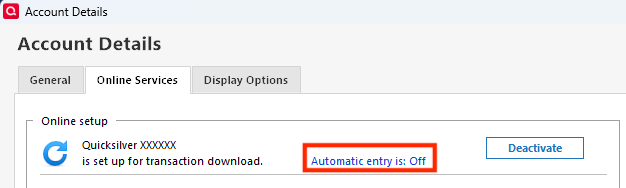
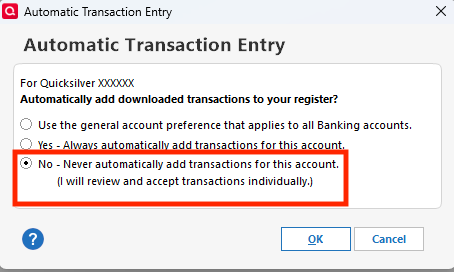
    2. If you want some, but not all registers to display this way, then navigate to Tools>Account List, click the Edit button next to the account you want to change, select the Online Services tab, then click the blue Automatic entry is: link. Select No - Never automatically add transactions for this account, then click OK.
    Screenshot 2025-08-19 at 5.28.54 PM.png Screenshot 2025-08-19 at 5.29.07 PM.png

    I hope this helps!

    Quicken Kristina

    Make sure to sign up for the email digest to see a round up of your top posts.

This discussion has been closed.