Printing checks (Q Mac)

ucsf2012
ucsf2012 Quicken Mac Subscription Member

I purchased checks from HarlandClark and I'm trying to print them in Quicken. I have the personal checks 3 to a page. I printed one check, that was fine. Now I want to print the 2nd check on the sheet. I see no where on the print check settings where I can tell Quicken to print to the "2nd check" on the sheet. How do I do this?


Tagged:

Best Answer

  • UKR
    UKR Quicken Windows Subscription SuperUser ✭✭✭✭✭
    Answer ✓

    For me, in my Quicken for Windows, printing personal size "Wallet Checks" or business size "Standard Checks" allows me to print

    • a full sheet of 3 checks
    • a partial page, i.e., a short sheet of 2 checks (the first check on the sheet was removed)
    • a partial page, i.e., a short sheet of 1 check (the first two checks on the sheet were removed)

    There are print selection options which describe what the top sheet inserted into the printer looks like.

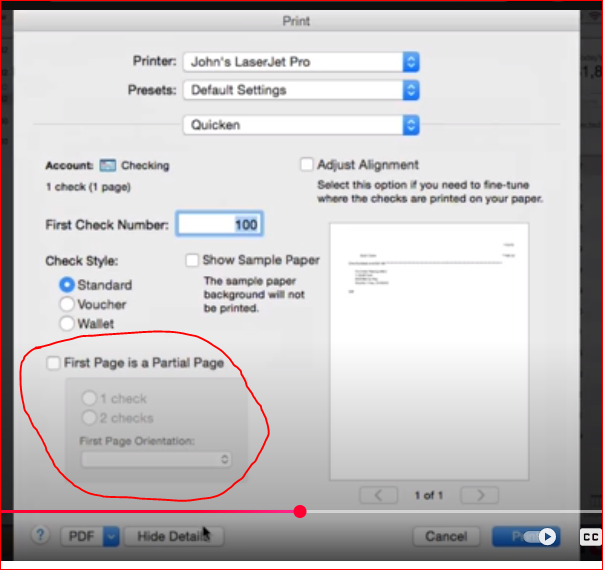
    For you, on Quicken for Mac, this Print Selection view should look something like this image grabbed from an old Q Mac 2015 video:

    image.png

    This is where you select that you will be printing on a partial page containing 1 or 2 checks.

    When you're down to having just 1 check remaining on the sheet also select how you will be feeding this short page into your printer: normal (portrait) or sideways (landscape) orientation.

Answers

  • UKR
    UKR Quicken Windows Subscription SuperUser ✭✭✭✭✭
    Answer ✓

    For me, in my Quicken for Windows, printing personal size "Wallet Checks" or business size "Standard Checks" allows me to print

    • a full sheet of 3 checks
    • a partial page, i.e., a short sheet of 2 checks (the first check on the sheet was removed)
    • a partial page, i.e., a short sheet of 1 check (the first two checks on the sheet were removed)

    There are print selection options which describe what the top sheet inserted into the printer looks like.

    For you, on Quicken for Mac, this Print Selection view should look something like this image grabbed from an old Q Mac 2015 video:

    image.png

    This is where you select that you will be printing on a partial page containing 1 or 2 checks.

    When you're down to having just 1 check remaining on the sheet also select how you will be feeding this short page into your printer: normal (portrait) or sideways (landscape) orientation.

  • Quicken Jasmine
    Quicken Jasmine Quicken Mac Subscription Alumni ✭✭✭✭

    Hello @ucsf2012,

    Thanks for reaching out.

    I do agree with @UKR's advice. Please let us know if this assists you!

    -Quicken Jasmine

    Make sure to sign up for the email digest to see a round-up of your top posts.

  • ucsf2012
    ucsf2012 Quicken Mac Subscription Member

    Thank you @UKR for your assistance. I was able to print the checks now without issue!

  • UKR
    UKR Quicken Windows Subscription SuperUser ✭✭✭✭✭

    You're welcome, @ucsf2012
    Out of curiosity … what make and model printer are you using for printing checks? And how easy or difficult is it to run partial pages thru the printer?

    I'm using a Canon G3270 printer. I print Voucher checks (one business size check and 2 stubs per sheet) because I find they are easiest to load and use.

This discussion has been closed.