Stopping the Population of Memo Column From Downloaded Transactions

recursor1
recursor1 Quicken Windows Subscription Member ✭✭✭

I could have sworn I saw a setting somewhere to deactivate the population of the memo field from matched downloaded transactions, but now I'm unable to find it. Does anyone know where it is?

Answers

  • jtemplin
    jtemplin Member ✭✭✭✭
    edited August 25

    I don't know about a setting, but this is the way I do it:

    1. Create a renaming rule for a transaction you want to take control over.
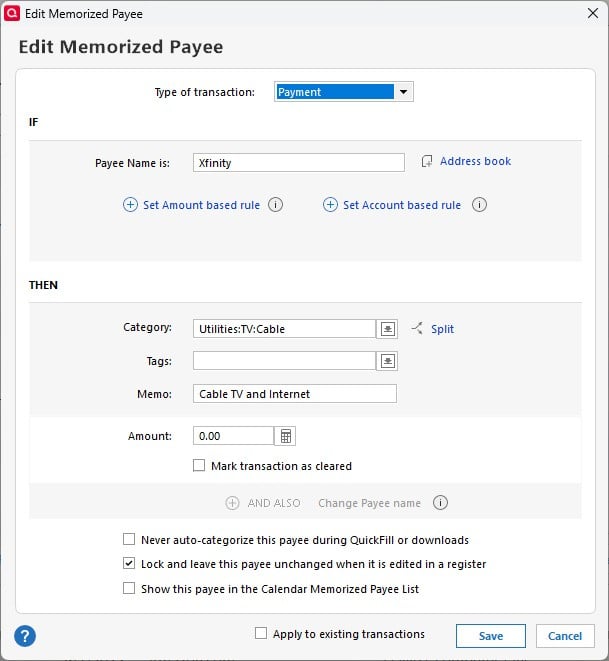
    2. Create a memorized payee that matches the renaming rule. You can edit as many fields as you want including memo in the transaction.

    For example:

    1. Renaming rule: If payee contains "Comcast" change payee to "Xfinity"
    2. Memorized payee: Xfinity.jpg You can skip step 1. if the names in your transactions are always the same, and the memorized payee would match that name. But because I have other payees that have variable names, I've gotten in the habit of using renaming rules all the time to standardize them. For example, whenever I shop at a Publix supermarket, the names of the transactions contain the store number of where I shopped. And I don't care about that. So, I use a renaming rule to rename any of those transactions containing the word "Publix" to simply "Publix". My Disney+ charge to my AMEX has changed how the name appears several times. But they all have "Disney" in the name and that always matches.
  • Chris_QPW
    Chris_QPW Quicken Windows Subscription Member ✭✭✭✭

    Account Details → Online Services tab → select "Don't update memo when downloading"

    This is a relatively new feature.

    The biggest problem with the "old method" that you are using @jtemplin is that you have to set the memo to something, you can't leave it blank or Quicken will always use the downloaded memo. On the other hand, if you want to see some of the memos, but block some for given payees, then the "old method" is the only way to do it.

    Signature:
    This is my website (ImportQIF is free to use):

    http://www.quicknperlwiz.com/

  • jtemplin
    jtemplin Member ✭✭✭✭

    @Chris_QPW Always learning something new. 🤯

  • recursor1
    recursor1 Quicken Windows Subscription Member ✭✭✭

    @jtemplin , thank you for your detailed response, and @Chris_QPW , thank you. Quicken has been making a lot of changes recently. I think the changes have been causing a lot of problems in certain circumstances, but overall it's a good sign.

This discussion has been closed.