Delete unnecessary files paths from dialog box

JayG
JayG Quicken Windows Subscription Member ✭✭

Is there a way to delete old/unused file paths in the backup dialog box in Quicken Deluxe for Windows R63.21 Build 27.1.63.21?
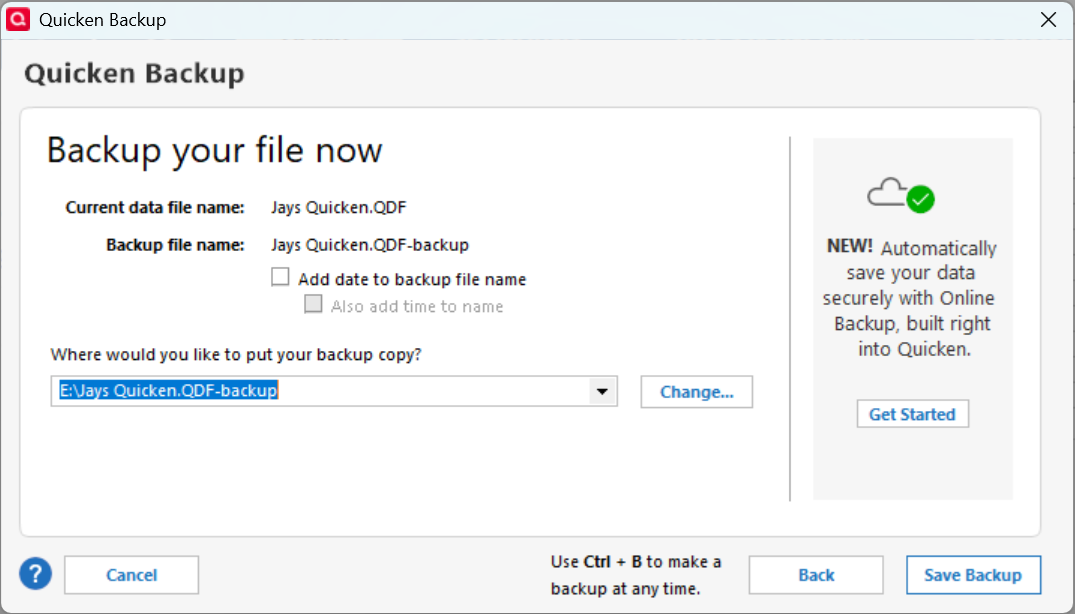
Quicken backup file location.png

Every time I change locations, the prior locations are still shown and the list continues to grow. I would like to edit the list to eliminate the ones I no longer need.

I am comfortable editing the registry if that is the only way. If editing the registry is the only way, I would suggest Quicken add a way to edit the list in an upcoming release.

Jay

Best Answer

  • BK
    BK Quicken Windows Subscription Member ✭✭✭✭
    Answer ✓

    The file you want to edit in notepad and remove the entries in "BackupPathX=" you no longer need is C:\[USER NAME]\AppData\Roaming\Quicken\config\QUSER.INI

    Make sure to create a backup copy of it before editing, just in case.

    - Q Win Deluxe user since 2010, US Subscription
    - I don't use Cloud Sync, Mobile & Web, Bill Pay/Mgr

Answers

  • NotACPA
    NotACPA Quicken Windows Subscription SuperUser ✭✭✭✭✭

    Just out of curiosity, see what happens if you remove the space between "Jays" and "Quicken".

    Q is old school, and REALLY prefers the 8.3 style formatting … where a space is a delimiter.

    Try changing the space to a dash or an underscore or just combining the 2 words.

    Q user since February, 1990. DOS Version 4
    Now running Quicken Windows Subscription, Business & Personal
    Retired "Certified Information Systems Auditor" & Bank Audit VP

  • BK
    BK Quicken Windows Subscription Member ✭✭✭✭
    Answer ✓

    The file you want to edit in notepad and remove the entries in "BackupPathX=" you no longer need is C:\[USER NAME]\AppData\Roaming\Quicken\config\QUSER.INI

    Make sure to create a backup copy of it before editing, just in case.

    - Q Win Deluxe user since 2010, US Subscription
    - I don't use Cloud Sync, Mobile & Web, Bill Pay/Mgr

  • JayG
    JayG Quicken Windows Subscription Member ✭✭

    @BK

    Thank you for your answer. 👍️

    Once one knows the secret, the solution is trivial.

    Regards,

    Jay

This discussion has been closed.
