Missing "reviewed" column in investment register

Yellowstone2016
Yellowstone2016 Quicken Windows Subscription Member ✭✭
edited October 5 in Investing (Windows)

I am running Quicken Classic Deluxe for Windows 11, version R64.23. In most of my investment accounts, I have a "reviewed" column (headed with a blue dot). However, in 2 of my investment registers, there is no reviewed column showing. I have Complete investing for all accounts (no "simple investing") and in preferences for investments in the "Register columns to hide" the "Reviewed flag" box is unchecked. I have validated and supervalidated the file and restarted several times. Any help getting this column to show up?

Best Answer

  • Chris_QPW
    Chris_QPW Quicken Windows Subscription Member ✭✭✭✭
    Answer ✓

    The Status column is associated with the concept of having the transactions go directly into the register and reviewing the transactions there.

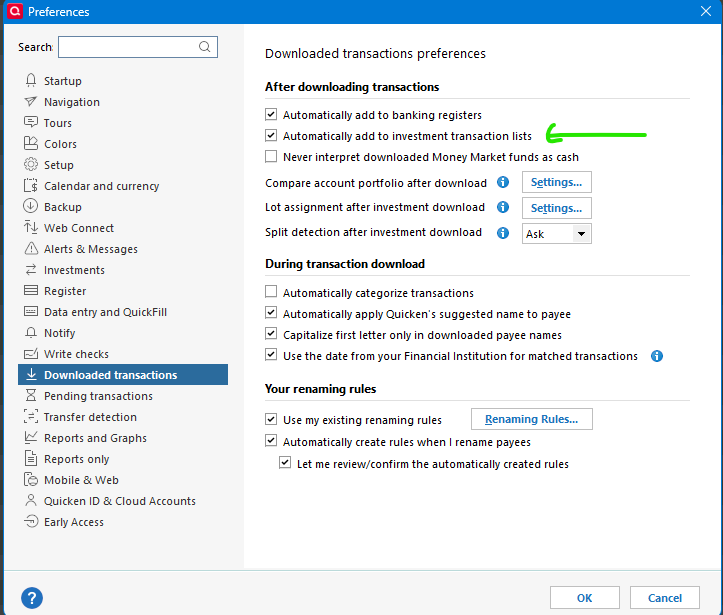
    There is a global preference for this, and one in each account which can override the global preference:

    image.png

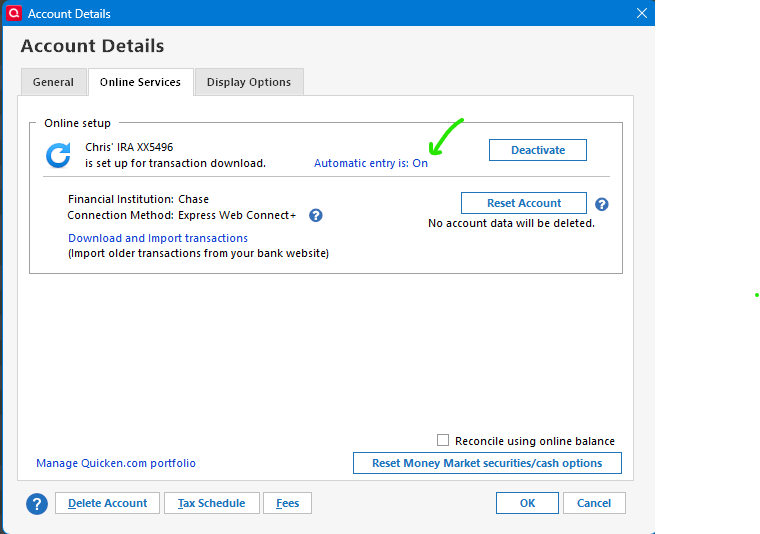
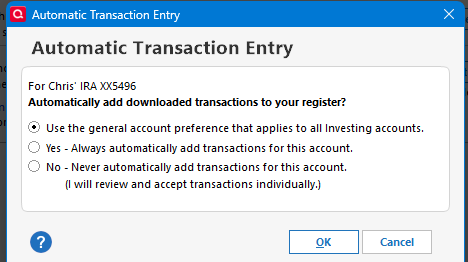
    And in each account: Account Details → Online Services tab:

    image.png image.png

    Signature:
    This is my website (ImportQIF is free to use):

    http://www.quicknperlwiz.com/

Answers

  • UKR
    UKR Quicken Windows Subscription SuperUser ✭✭✭✭✭

    AFAIK, only Linked Cash Account Registers, i.e., cash/checking account registers linked to a taxable brokerage account register, will have a Status column available (that's the one with the blue dot in the title row)
    The investment register, whether brokerage or retirement account, itself does not.

  • Chris_QPW
    Chris_QPW Quicken Windows Subscription Member ✭✭✭✭
    Answer ✓

    The Status column is associated with the concept of having the transactions go directly into the register and reviewing the transactions there.

    There is a global preference for this, and one in each account which can override the global preference:

    image.png

    And in each account: Account Details → Online Services tab:

    image.png image.png

    Signature:
    This is my website (ImportQIF is free to use):

    http://www.quicknperlwiz.com/

  • Yellowstone2016
    Yellowstone2016 Quicken Windows Subscription Member ✭✭

    That was it! I had the global preferences checked to automatically download to investment accounts, but did not have "automatic entry: on" in the one account. Thanks for the help!

This discussion has been closed.